
Choosing the right cloud platform can make or break your project’s success. With cloud computing projected to reach $1.9 trillion by 2030, the stakes have never been higher for businesses evaluating infrastructure options. Two platforms consistently dominate conversations among developers and startups: Amazon Web Services (AWS), the undisputed market leader, and DigitalOcean, the developer-focused alternative known for simplicity and transparent pricing.
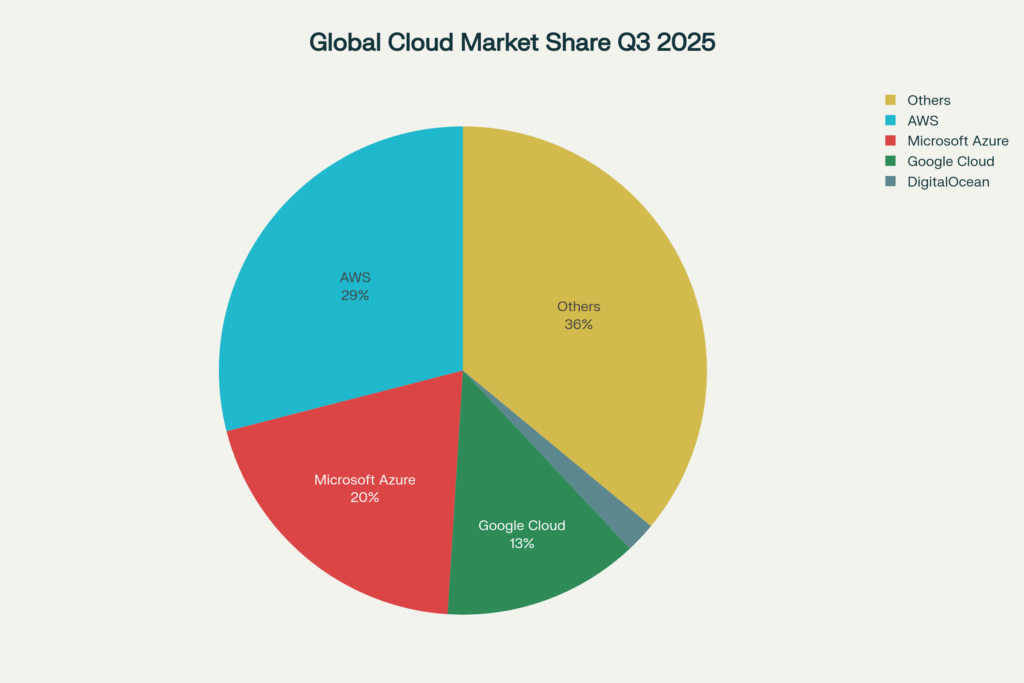
AWS commands 29-31% of the global cloud market, offering over 200 services spanning virtually every aspect of cloud computing. It powers giants like Netflix, Airbnb, and NASA, delivering unmatched breadth, depth, and global infrastructure.
DigitalOcean holds 2% market share but has captured the hearts of over 600,000 developers worldwide with its intuitive interface, flat-rate pricing, and laser focus on the essentials that most businesses actually need.
The fundamental question is not which platform is “better” in absolute terms, but which one aligns with your specific needs, budget, team size, and technical requirements. This comprehensive guide compares AWS vs DigitalOcean across every dimension that matters: pricing transparency, service offerings, performance benchmarks, ease of use, scalability, support, and real-world use cases.
Whether you’re a startup founder evaluating options for your MVP, a developer building side projects, or an engineering leader planning infrastructure strategy, this guide provides the data-driven insights needed to make the right choice.
Understanding the Platforms: Core Philosophy and Target Audience
Amazon Web Services (AWS): The Comprehensive Cloud Giant
AWS, launched in 2006, pioneered the modern cloud computing industry and remains its dominant force. With 36 regions, 114 availability zones, and over 200 fully featured services, AWS provides solutions for virtually any cloud computing scenario imaginable.
Core AWS Strengths:
- Unmatched Service Breadth: Over 200 services covering compute, storage, databases, networking, AI/ML, IoT, blockchain, quantum computing, and more
- Global Infrastructure: The most extensive network of data centers worldwide, including specialized regions like AWS GovCloud and AWS China
- Advanced Features: Cutting-edge capabilities like SageMaker for ML, Redshift for data warehousing, and Lambda for serverless computing
- Enterprise Focus: Robust compliance certifications (HIPAA, GDPR, FedRAMP), enterprise support, and dedicated account management
- Mature Ecosystem: Extensive partner network, thousands of third-party integrations, and a massive developer community
AWS Target Users:
- Enterprises requiring comprehensive cloud capabilities
- Organizations with complex, multi-region deployments
- Companies building advanced AI/ML applications
- Businesses needing specialized services (big data, IoT, quantum)
- Teams with cloud expertise and DevOps capabilities
Market Position: AWS holds 29% of global cloud infrastructure spending as of Q3 2025, processing $107 billion in enterprise cloud infrastructure in the quarter.
DigitalOcean: The Developer-Friendly Cloud Alternative
DigitalOcean, founded in 2012, carved out its niche by radically simplifying cloud infrastructure. Rather than competing with AWS on breadth, DigitalOcean focused on delivering core services exceptionally well with transparent pricing and an intuitive developer experience.
Core DigitalOcean Strengths:
- Simplicity First: Intuitive interface that requires no certifications or extensive training to use effectively
- Transparent Pricing: Flat-rate monthly costs with generous bandwidth included, no surprise bills
- Fast Deployment: Deploy virtual machines in 55 seconds compared to AWS’s 1-3 minutes
- Developer Experience: Excellent documentation, community tutorials, and APIs designed for developers
- Cost Efficiency: 30-50% cheaper than AWS for comparable workloads
- Reduced Management: Businesses save up to $545,000 in IT expenses over three years through simpler management
DigitalOcean Target Users:
- Startups and small businesses seeking cost-effective solutions
- Developers building web applications, APIs, and SaaS products
- Teams without dedicated DevOps or cloud specialists
- Budget-conscious projects requiring predictable costs
- Companies wanting to avoid vendor lock-in
Market Position: DigitalOcean holds 2% of the cloud market but serves over 600,000 customers globally, particularly dominating the developer and startup segments.
Core Platform Differences at a Glance
Understanding the fundamental distinctions helps frame the more detailed comparisons that follow.
| Feature | AWS | DigitalOcean |
|---|---|---|
| Target Audience | Enterprises, all business sizes | Developers, startups, SMBs |
| Market Share (2025) | 29-31% | 2% |
| Founded | 2006 | 2012 |
| Global Reach | 36 regions, 114 availability zones | 15 data centers across 9 regions |
| Total Services | 200+ services | Core essentials (compute, storage, DB) |
| Pricing Model | Pay-as-you-go, complex | Flat-rate, transparent |
| Learning Curve | Steep, requires expertise | Minimal, intuitive |
| Core Strength | Breadth and depth of services | Simplicity and developer experience |
| Deployment Speed | 1-3 minutes | 55 seconds |
| Support Cost | 10% of monthly spend for Business tier | Free for all, $24/month for premium |
The Critical Question: Pricing Transparency and Cost Comparison
For most startups and growing businesses, pricing is the decision-making factor. The difference between AWS and DigitalOcean pricing models is stark and has significant implications for budget predictability.
DigitalOcean’s Transparent, Flat-Rate Model
DigitalOcean pioneered predictable cloud pricing that removes the guesswork from budgeting. Every service has a clear monthly price that includes essential resources without hidden fees or surprise charges.
DigitalOcean Pricing Philosophy:
- Flat Monthly Rates: Droplets start at $4/month for basic instances, $6/month for 1GB RAM with 25GB SSD and 1TB bandwidth
- All-Inclusive Pricing: Storage, bandwidth (up to generous limits), and monitoring included in base price
- Consistent Regional Pricing: Unlike AWS, prices remain the same across all DigitalOcean regions
- Low Overage Rates: If you exceed bandwidth, DigitalOcean charges just $0.01/GB compared to AWS’s $0.05-$0.09/GB
- Bandwidth Pooling: Share bandwidth across multiple Droplets in the same account for added flexibility
- 28-Day Billing: DigitalOcean charges for only 28 days per month, even in 31-day months
Example DigitalOcean Pricing:
- Basic Droplet ($6/month): 1 vCPU, 1GB RAM, 25GB SSD, 1TB bandwidth
- CPU-Optimized Droplet ($84/month): 4 vCPU, 8GB RAM, 50GB SSD, 5TB bandwidth
- Managed PostgreSQL ($60/month): 2 vCPU, 4GB RAM, 60GB storage
- Object Storage Spaces ($20/month): 1TB storage, 1TB outbound transfer included
AWS’s Complex, Usage-Based Pricing
AWS follows a pay-as-you-go model where costs accumulate based on actual resource consumption. While flexible and potentially cost-effective with optimization, this model introduces significant complexity.
AWS Pricing Challenges:
- Per-Second Billing: Most services bill by the second, making costs difficult to predict
- Region-Based Pricing: Same service costs different amounts in different regions
- Separate Component Charges: Storage, bandwidth, IOPS, and API calls all billed separately
- Hidden Costs: Data transfer between services, stopped instances with attached storage, and more
- Complexity: Over 200 services each with unique pricing models requiring extensive knowledge
Example AWS Pricing Breakdown:
A seemingly simple $8.47/month t2.micro instance balloons to $100.97/month after adding:
- 25GB EBS storage: +$2.50/month
- 1TB data transfer out: +$90/month
- Total: $100.97/month vs DigitalOcean’s $6/month for comparable specs
AWS Cost Optimization Options:
- Reserved Instances: Save up to 72% by committing to 1-3 year terms, but requires accurate forecasting
- Savings Plans: Flexible commitment-based discounts, but adds complexity
- Spot Instances: Up to 90% discount for interruptible workloads, requires specialized architecture
While these options provide savings for enterprises, they add layers of complexity unsuitable for lean teams.

| Service/Configuration | AWS Monthly Cost | DigitalOcean Monthly Cost | Cost Difference |
|---|---|---|---|
| Small VM(1 vCPU, 1GB RAM) | $8.47 (t2.micro) | $6.00 (Basic Droplet) | DigitalOcean 29% cheaper |
| Medium VM(4 vCPU, 8GB RAM) | $124.10 (c6i.xlarge) | $84.00 (CPU-optimized) | DigitalOcean 32% cheaper |
| Object Storage(1TB) | $24.63 | $20.00 | DigitalOcean 19% cheaper |
| Load Balancer | $22.57 | $12.00 | DigitalOcean 47% cheaper |
| Managed PostgreSQL(2vCPU, 4GB) | $57.59 (db.t3.medium) | $60.00 | Comparable |
| Managed Redis(1vCPU, 1GB) | $24.82 (cache.t2.small) | $15.00 | DigitalOcean 40% cheaper |
| Data Transfer Out(1TB) | $90.00 ($0.09/GB) | $10.00 ($0.01/GB) | DigitalOcean 89% cheaper |
| Bandwidth Included | Not included | 500GB-6TB included | Significant advantage |
| Support(Business Tier) | 10% of monthly spend | $99/month flat rate | Cheaper for smaller teams |
Key Findings:
- DigitalOcean is 30-50% cheaper for standard workloads
- Data transfer represents the single biggest cost difference (89% cheaper)
- Bandwidth inclusion provides massive savings for high-traffic applications
Real-World Cost Savings Examples
NoBid (Ad-Tech Startup): Processing 200 billion auctions monthly, NoBid migrated from AWS to DigitalOcean and reduced monthly costs from their AWS bill to 20-30% cheaper.
Picap (Ride-Sharing Company): Reduced monthly cloud spending from $120,000 on AWS to $30,000 on DigitalOcean, a 75% cost reduction while handling over 1.5 million rides monthly with just one DevOps engineer.
These examples illustrate that DigitalOcean’s cost advantages scale, not just for small projects but for substantial production workloads.
Service Offerings: Breadth vs Focused Excellence
AWS: Comprehensive Service Portfolio
AWS offers over 200 services organized into dozens of categories, providing solutions for virtually every conceivable cloud computing need.
AWS Core Service Categories:
Compute: EC2 (virtual machines), Lambda (serverless), Lightsail (simplified VPS), Elastic Beanstalk (PaaS), ECS/EKS (containers), Fargate (serverless containers), Batch (batch processing)
Storage: S3 (object), EBS (block), EFS (file), Glacier (archive), Storage Gateway (hybrid), Snow Family (edge/data transfer)
Databases: RDS (relational), DynamoDB (NoSQL), ElastiCache (in-memory), Redshift (data warehouse), DocumentDB (MongoDB-compatible), Neptune (graph), Timestream (time-series)
Networking: VPC (virtual networks), Route 53 (DNS), CloudFront (CDN), Direct Connect (dedicated connection), Global Accelerator (global routing), API Gateway (API management)
AI/ML: SageMaker (ML platform), Rekognition (image/video analysis), Lex (conversational interfaces), Polly (text-to-speech), Comprehend (NLP), Translate (language translation)
Analytics: Athena (SQL queries on S3), EMR (big data processing), Kinesis (streaming), Glue (ETL), QuickSight (BI), Lake Formation (data lakes)
Security: IAM (identity), GuardDuty (threat detection), Shield (DDoS protection), WAF (firewall), CloudHSM (hardware security), Secrets Manager (credentials)
Developer Tools: CodeCommit (source control), CodeBuild (CI), CodeDeploy (deployment), CodePipeline (CI/CD), Cloud9 (IDE)
This breadth enables AWS to serve as a one-stop shop for enterprises requiring diverse capabilities. However, it also introduces decision paralysis and requires significant expertise to navigate effectively.
DigitalOcean: Essential Services Done Exceptionally Well
DigitalOcean deliberately limits its service portfolio to core infrastructure essentials, focusing on developer experience and simplicity.
DigitalOcean Core Services:
Compute:
- Droplets (virtual machines): Basic (shared CPU), General Purpose, CPU-Optimized, Memory-Optimized
- GPU Droplets: NVIDIA H100/L40S for AI/ML workloads via Paperspace acquisition
- Kubernetes: Managed Kubernetes (DOKS) with free control plane
Storage:
- Spaces: S3-compatible object storage starting at $5/month for 250GB
- Volumes: Block storage for persistent data on Droplets
- Backups: Automated Droplet backups and snapshots
Databases:
- Managed Databases: PostgreSQL, MySQL, MongoDB, Redis
- Automated backups, point-in-time recovery, read replicas
- Simple scaling and maintenance
Platform:
- App Platform: Deploy apps directly from Git with built-in CI/CD
- Functions: Serverless functions integrated with App Platform
- 1-Click Apps: Pre-configured application stacks (WordPress, Docker, LAMP)
AI/ML:
- GPU Droplets: NVIDIA GPUs for training and inference
- GenAI Platform: Build and deploy AI agents without specialized expertise
- 1-Click AI Models: Deploy Hugging Face models instantly
Networking:
- Load Balancers: Distribute traffic across Droplets ($12/month)
- Cloud Firewalls: Free inbound/outbound traffic control
- VPC (Virtual Private Cloud): Isolated private networks
- DNS Management: Domain management and routing
- Floating IPs: Reserved static IP addresses
Developer Tools:
- API and CLI: Comprehensive automation capabilities
- Terraform Provider: Infrastructure as Code support
- Monitoring: Built-in resource monitoring and alerting
- Uptime Monitoring: Track application availability
DigitalOcean’s focused approach means developers spend less time choosing between services and more time building.
AWS Lightsail: AWS’s DigitalOcean Alternative
Recognizing DigitalOcean’s appeal, AWS created Lightsail, a simplified VPS offering with predictable pricing. Lightsail provides pre-configured instances, managed databases, and straightforward networking for users who find AWS overwhelming.
Lightsail Advantages:
- Easy on-ramp to AWS ecosystem
- Simple pricing similar to DigitalOcean
- Ability to transition to full AWS services as needs grow
Lightsail Limitations:
- Still more complex than DigitalOcean
- Fewer regions than core AWS services
- Limited compared to DigitalOcean’s developer experience
Lightsail represents AWS’s acknowledgment that not everyone needs 200 services, though most developers still find DigitalOcean simpler and more cost-effective.
Performance and Reliability: Speed, Uptime, and Global Reach
Performance Benchmarks: DigitalOcean’s Surprising Advantage
Independent benchmarks reveal that DigitalOcean delivers exceptional performance, particularly on a cost-performance basis.
Key Performance Metrics:
| Metric | AWS | DigitalOcean |
|---|---|---|
| VM Deployment Speed | 1-3 minutes | 55 seconds |
| CPU Performance per Dollar | Baseline (1.0x) | 20-40% better |
| Network Performance | Excellent (global network) | Good (15 data centers) |
| Storage I/O Performance | High (provisioned IOPS available) | High (all SSD storage) |
| Database Query Speed | Fast (optimized instances) | Fast (SSD-backed) |
| Global Latency (US-Asia) | Lower (more edge locations) | Higher (fewer locations) |
| Uptime SLA | 99.99% (most services) | 99.99% (core services) |
| API Response Time | Variable by region | Consistent across regions |
Notable Findings:
Deployment Speed: DigitalOcean provisions VMs in 55 seconds vs AWS’s 1-3 minutes, accelerating development cycles
Cost-Performance: DigitalOcean delivers 20-40% better CPU performance per dollar for standard workloads, making it more economical for compute-intensive applications
Consistency: DigitalOcean’s uniform infrastructure provides consistent performance across regions, while AWS performance varies by region and instance type
SSD-Backed Storage: All DigitalOcean Droplets use SSD storage by default, whereas AWS requires explicit provisioning and additional costs for optimal storage performance
Uptime and Reliability
Both platforms provide 99.99% uptime SLAs for core services, translating to approximately 52 minutes of allowed downtime per year.
AWS Reliability:
- Multiple Availability Zones per region for redundancy
- Proven track record with Fortune 500 companies
- Advanced disaster recovery and backup options
- Global network with extensive edge locations
DigitalOcean Reliability:
- 99.99% uptime SLA on select core services
- Automated backups and snapshots
- Monitoring and alerting included
- Simpler architecture reduces complexity-related failures
While AWS provides more sophisticated redundancy options, DigitalOcean’s reliability proves sufficient for most applications, with simpler failover configurations.
Global Infrastructure and Latency
AWS Global Footprint:
- 36 regions worldwide with 114 availability zones
- Extensive edge network for CloudFront CDN
- Multiple Availability Zones per region (typically 3+)
- Specialized regions (GovCloud, China, isolated regions)
- Optimal for multi-region deployments and global traffic
DigitalOcean Global Presence:
- 15 data centers across 9 regions
- Uniform pricing across all regions
- Key locations: NYC, San Francisco, Amsterdam, Singapore, London, Frankfurt, Toronto, Bangalore, Sydney
- Sufficient for most startups and SMB applications
For applications requiring true global distribution with minimal latency worldwide, AWS’s extensive infrastructure provides clear advantages. For businesses serving specific regions or those not requiring global reach, DigitalOcean’s 15 locations prove adequate at lower cost.
Ease of Use: Developer Experience and Learning Curve
DigitalOcean: Simplicity as a Core Value
DigitalOcean built its reputation on making cloud infrastructure accessible to developers without requiring specialized DevOps expertise.
Intuitive Interface:
- Clean, modern UI requiring no training to navigate
- Deploy Droplets in 3-4 clicks
- Clear dashboard showing all resources at a glance
- Unified billing with predictable monthly invoices
Excellent Documentation:
- Over 8,000 community tutorials covering common scenarios
- Clear API documentation with examples in multiple languages
- Step-by-step guides for popular application stacks
- Active community forums and Q&A
Developer-Friendly Features:
- 1-Click Applications for WordPress, Docker, LAMP, etc.
- Simple API and CLI for automation
- Terraform provider for Infrastructure as Code
- SSH key management and 2FA included
Reduced Management Overhead:
- Managed Kubernetes with free control plane (vs AWS EKS $0.10/hour)
- Automated database backups and updates
- Simple monitoring without complex configuration
- Free technical support for all customers
A developer can go from signup to running application in under 10 minutes, compared to hours or days required to master AWS’s complexity.
AWS: Power with Complexity
AWS provides immense capability but requires significant investment in learning and expertise.
Steep Learning Curve:
- Over 200 services with overlapping capabilities
- Requires AWS certifications for proficiency (Solutions Architect, SysOps, etc.)
- Complex IAM permission models
- Service-specific configuration and best practices
- Fragmented documentation across hundreds of services
Enterprise Features:
- Fine-grained control over every configuration parameter
- Extensive automation capabilities via CloudFormation, CDK, and SAM
- Advanced networking options (Transit Gateway, Private Link)
- Sophisticated security controls and compliance tools
- Comprehensive monitoring via CloudWatch
Common Challenges:
- Decision paralysis: Which of 5 compute options should I use?
- Configuration errors leading to security vulnerabilities
- Unexpected costs from misconfigured resources
- Time investment required to master platform
AWS acknowledges this complexity, offering AWS Lightsail as a simplified entry point. However, most teams working with AWS dedicate significant resources to training and management.
Scalability: Growing Your Infrastructure
DigitalOcean Scaling Approach
DigitalOcean supports linear, predictable scaling suitable for most startup and SMB growth trajectories.
Vertical Scaling:
- Resize Droplets to larger instances with more CPU, RAM, disk
- Simple process through dashboard or API
- Minimal downtime for most scaling operations
- Clear pricing for each tier
Horizontal Scaling:
- Deploy additional Droplets in seconds
- Use Load Balancers to distribute traffic ($12/month)
- Bandwidth pooling across multiple Droplets
- Manual or API-automated scaling
Kubernetes Scaling:
- Managed Kubernetes (DOKS) with horizontal pod autoscaling
- Cluster autoscaling to add nodes automatically
- Free control plane (AWS charges $0.10/hour for EKS)
- Simple integration with other DigitalOcean services
Database Scaling:
- Vertical scaling by resizing database clusters
- Read replicas for distributing read traffic
- Automated failover for high availability
- Straightforward scaling process
Limitations:
- No automatic scaling based on metrics (requires manual setup or third-party tools)
- Fewer instance size options compared to AWS
- Limited to 15 geographic regions
DigitalOcean scaling is straightforward and predictable, though requires more manual intervention than AWS’s sophisticated auto-scaling features.
AWS Scaling Capabilities
AWS provides advanced auto-scaling across virtually all services, handling massive growth automatically.
Auto Scaling Groups:
- Automatically add/remove EC2 instances based on metrics
- Schedule-based scaling for predictable patterns
- Target tracking to maintain specific metrics
- Integration with Load Balancers and CloudWatch
Serverless Scaling:
- Lambda functions scale to handle millions of requests automatically
- DynamoDB auto-scales read/write capacity
- API Gateway handles massive traffic spikes
- S3 scales to trillions of objects seamlessly
Global Distribution:
- Multi-region deployments with Route 53 traffic routing
- CloudFront CDN for content distribution
- Global Accelerator for optimal routing
- Cross-region replication for redundancy
Specialized Instances:
- Over 500 instance types optimized for specific workloads
- GPU instances for ML/AI (P4, G5)
- High-memory instances up to 768GB RAM
- Specialized instances for HPC, storage, networking
AWS excels at handling unpredictable, massive-scale workloads with minimal manual intervention once configured. However, this sophistication requires expertise to implement correctly.
Support and Community: Getting Help When You Need It
DigitalOcean Support: Accessible and Customer-First
DigitalOcean’s support philosophy emphasizes accessibility and community, with free support for all customers.
Support Tiers:
Starter (Free): Included for all customers
- Email support
- Response time: Under 24 hours
- Average resolution: 48 hours
- Community forums and tutorials
Developer ($24/month): For non-production workloads
- Email support
- Response time: Under 8 hours
- Average resolution: 16 hours
Standard ($99/month): For production workloads
- Email and live chat support
- Response time: Under 2 hours
- Average resolution: 4 hours
- High-level technical staff with product expertise
Premium ($999/month): For mission-critical applications
- Dedicated Slack channel, live chat, video calls, email
- Response time: 30 minutes
- Average resolution: 2 hours
- Dedicated business and technical advisors
- Monthly account activity reports
Community Resources:
- Over 8,000 tutorials covering common scenarios
- Active community forums with peer support
- Regular webinars and educational content
- Responsive social media presence
DigitalOcean’s flat-rate support pricing provides predictability, especially beneficial for smaller teams with limited budgets.
AWS Support: Comprehensive but Expensive
AWS offers tiered support with costs scaling based on monthly spending, which can become expensive.
Support Plans:
Basic (Free): Limited support
- Documentation, whitepapers, forums only
- No technical support tickets
- Community support only
Developer ($29/month or 3% of monthly charges): For testing/development
- Business hours support
- 12-24 hour response for general guidance
- Email-only support
Business ($100/month minimum or 10% of monthly charges): For production workloads
- 24/7 email, chat, and phone support
- 1-hour response for urgent issues
- AWS Trusted Advisor (full checks)
- Third-party software support
Enterprise On-Ramp ($5,000/month or 10%): Bridge to Enterprise
- 30-minute response for critical issues
- Concierge support team
- Infrastructure Event Management
Enterprise ($15,000/month or varies): For mission-critical systems
- 15-minute response for critical issues
- Dedicated Technical Account Manager
- Proactive guidance and reviews
- Access to AWS experts
Cost Implications:
For a company spending $10,000/month on AWS, Business Support adds $1,000/month. At $50,000/month, that’s $5,000/month for support alone. This percentage-based model makes AWS support prohibitively expensive for many growing businesses.
Support Comparison Verdict
For startups and SMBs, DigitalOcean’s support model provides better value with accessible, knowledgeable assistance at predictable costs. AWS’s support excels for enterprises willing to pay premium prices for dedicated technical account management and 15-minute response times.
Security and Compliance: Protecting Your Infrastructure
DigitalOcean Security: Solid Fundamentals
DigitalOcean provides robust security fundamentals without overwhelming users with complexity.
Security Features:
Data Protection:
- Automatic encryption at rest using LUKS for persistent disks
- TLS/SSL encouraged with free Let’s Encrypt integration
- S3-compatible Spaces with encryption
Network Security:
- Free Cloud Firewalls for inbound/outbound traffic control
- VPC (Virtual Private Cloud) for isolated private networks
- DDoS protection included at no extra charge (Layer 3/4)
Access Control:
- SSH key management
- Two-factor authentication (2FA)
- Team-based access controls
- Scoped API tokens with granular permissions
Compliance:
- SOC 2 Type II certified
- SOC 3 certified
- CSA STAR Level 1
- GDPR compliant
Monitoring:
- Automated security updates for managed services
- Free monitoring and alerting
- Audit logging for API actions
DigitalOcean’s security is sufficient for most startups and SMBs, with straightforward implementation that doesn’t require dedicated security specialists.
AWS Security: Enterprise-Grade Controls
AWS provides comprehensive security capabilities suitable for highly regulated industries.
Advanced Security Features:
Identity and Access:
- IAM with fine-grained permissions
- Multi-factor authentication (MFA)
- Identity federation and SSO
- IAM Access Analyzer for policy verification
Data Protection:
- KMS (Key Management Service) for encryption keys
- CloudHSM for dedicated hardware security modules
- Certificate Manager for SSL/TLS
- Macie for sensitive data discovery
- Secrets Manager for credential storage
Network Security:
- Security Groups and Network ACLs
- AWS WAF (Web Application Firewall)
- Shield Standard (free DDoS) and Shield Advanced
- VPC Flow Logs for traffic analysis
Threat Detection:
- GuardDuty for intelligent threat detection
- Inspector for vulnerability assessments
- Detective for security investigation
- Security Hub for centralized security view
Compliance:
- SOC 1/2/3, ISO 27001, PCI-DSS
- HIPAA, FedRAMP, GDPR
- FIPS 140-2 validated endpoints
- Industry-specific compliance (HITRUST, FISMA)
Audit and Logging:
- CloudTrail for API call logging
- Config for configuration tracking
- VPC Flow Logs for network monitoring
While AWS offers superior security capabilities for enterprises with stringent requirements, this sophistication creates risk of misconfiguration. Studies show misconfiguration causes 70% of cloud security breaches, making AWS’s complexity a potential liability without expertise.
Security Verdict
Choose DigitalOcean if you need solid security fundamentals without complexity. Choose AWS if you require advanced security controls, extensive compliance certifications, or operate in heavily regulated industries (healthcare, finance, government).
Use Cases: When to Choose Which Platform
Choose DigitalOcean When You Need:
1. Startup MVP or Prototype
- Fast deployment (55 seconds to running instance)
- Transparent pricing for accurate budgeting
- Simple management without dedicated DevOps
- Predictable costs during uncertain growth phase
2. Small to Medium Web Applications
- Standard LAMP, Node.js, Python, Ruby stacks
- E-commerce stores (WooCommerce, Magento, Shopify)
- Content management systems (WordPress, Drupal)
- API backends for mobile or web apps
3. Simple SaaS Applications
- Multi-tenant applications with straightforward architecture
- App Platform for automated deployment from Git
- Managed databases without complex configuration
- Cost-effective horizontal scaling
4. Developer Projects and Side Projects
- Learning cloud infrastructure
- Personal portfolios and blogs
- Open-source projects
- Experimentation without budget concerns
5. Budget-Conscious Production Workloads
- Clear cost constraints and need for predictability
- High bandwidth requirements (included vs expensive on AWS)
- Small team without cloud expertise
- 30-50% cost savings compared to AWS
Real Success Stories:
- Picap (ride-sharing): Reduced costs from $120,000 to $30,000/month while handling 1.5M+ rides monthly
- NoBid (ad-tech): Processing 200 billion auctions monthly, 20-30% cheaper than AWS
Choose AWS When You Need:
1. Enterprise-Scale Applications
- Global, multi-region deployments
- Millions of concurrent users
- Petabyte-scale data processing
- Advanced compliance requirements (HIPAA, FedRAMP)
2. Complex Microservices Architectures
- Service mesh with App Mesh
- Advanced container orchestration
- Serverless with Lambda, SQS, SNS, EventBridge
- Sophisticated monitoring and observability
3. Big Data and Analytics
- Data lakes with S3 and Lake Formation
- Redshift for data warehousing
- EMR for Hadoop/Spark processing
- Athena for ad-hoc SQL queries on massive datasets
4. Advanced AI/ML Applications
- SageMaker for end-to-end ML pipelines
- Specialized ML services (Rekognition, Comprehend, Translate)
- GPU instances optimized for training (P4, G5)
- Pre-trained models and managed services
5. Specialized Workloads
- IoT with AWS IoT Core and Greengrass
- Blockchain with Amazon Managed Blockchain
- Quantum computing with Amazon Braket
- Game development with GameLift
6. Hybrid Cloud and On-Premises Integration
- AWS Outposts for on-premises AWS infrastructure
- Direct Connect for dedicated network connections
- Storage Gateway for hybrid storage
- VMware Cloud on AWS for VMware workloads
| Scenario | Best Choice | Why |
|---|---|---|
| Startup MVP/Prototype | DigitalOcean | Fast deployment, transparent pricing, easy scaling |
| Small Web Application | DigitalOcean | Lower cost, simple management, included bandwidth |
| Simple SaaS Application | DigitalOcean | App Platform simplifies deployment, predictable costs |
| Enterprise Application | AWS | Comprehensive services, advanced features, compliance |
| Global Multi-Region Deployment | AWS | More regions, better global infrastructure |
| Complex Microservices | AWS | Advanced orchestration, service mesh, monitoring |
| Big Data Analytics | AWS | Specialized big data services (Redshift, EMR, Athena) |
| Machine Learning Pipeline | AWS | SageMaker, extensive ML services, GPU options |
| E-commerce Store | Either | Both handle well; choose based on budget/complexity |
| Budget-Conscious Project | DigitalOcean | 30-50% cheaper, no hidden fees, transparent pricing |
Migration Considerations: Switching Platforms
Migrating FROM AWS to DigitalOcean
Many companies migrate from AWS to DigitalOcean to reduce costs and simplify operations.
Migration Advantages:
- 30-50% cost savings
- Simplified management and operations
- Reduced vendor lock-in (DigitalOcean uses open standards)
- Transparent, predictable pricing
- Free migration assistance from DigitalOcean
Migration Challenges:
- AWS-specific services (Lambda, DynamoDB, SQS) require re-architecting
- Data transfer out fees from AWS can be substantial ($0.05-$0.09/GB)
- Loss of some advanced AWS features
- Fewer global regions (15 vs 36)
Migration Process:
- Audit current AWS infrastructure and dependencies
- Identify AWS-specific services requiring alternatives
- Plan migration in phases (non-critical first)
- Use DigitalOcean’s free migration support
- Leverage standard technologies (Linux VMs, PostgreSQL, etc.)
- Test thoroughly in DigitalOcean environment
- Execute cutover during low-traffic period
DigitalOcean provides free migration assistance, including expert guidance, architecture planning, and technical support to streamline transitions.
Migrating FROM DigitalOcean to AWS
Some companies outgrow DigitalOcean and migrate to AWS for advanced capabilities.
Migration Triggers:
- Need for global multi-region deployments
- Requirements for specialized services (advanced AI/ML, big data)
- Enterprise compliance requirements
- Sophisticated auto-scaling needs
- Outgrowing DigitalOcean’s service offerings
Migration Process:
- Leverage standard technologies (DigitalOcean uses open standards)
- Droplets transition easily to EC2 instances
- Spaces (S3-compatible) migrate smoothly to S3
- Databases transfer to RDS with minimal changes
- Kubernetes workloads move to EKS
The open-source-friendly nature of DigitalOcean services makes migration to AWS relatively straightforward compared to the reverse.
Vendor Lock-In Comparison
| Factor | AWS | DigitalOcean |
|---|---|---|
| Ease of Migration FROM | Complex (proprietary services) | Easier (standard technologies) |
| Vendor Lock-in Risk | High (DynamoDB, Lambda, SQS) | Low (uses open standards) |
| Data Egress Costs | High ($0.05-$0.09/GB) | Low ($0.01/GB) |
| Migration Tools Available | AWS Migration Hub, DMS | Migration guides, free assistance |
| Technology Standards | Proprietary + Open source | Primarily open source |
| Multi-cloud Support | Limited support | Multi-cloud friendly |
| Exit Difficulty | Difficult and expensive | Relatively straightforward |
DigitalOcean’s commitment to open standards and S3-compatible APIs reduces lock-in risk significantly compared to AWS.
Final Verdict: Which Cloud Platform Should You Choose?
There is no universal “best” cloud provider. The optimal choice depends on your specific circumstances, priorities, and growth trajectory.
Choose DigitalOcean If:
✅ You’re a startup, small business, or individual developer
✅ You prioritize simplicity and ease of use
✅ You need transparent, predictable pricing
✅ Your team lacks extensive cloud expertise
✅ You want 30-50% cost savings compared to AWS
✅ You have high bandwidth requirements
✅ You want to avoid vendor lock-in
✅ You need fast deployment (55 seconds)
✅ You’re building standard web applications, APIs, or SaaS products
✅ You value excellent documentation and community support
DigitalOcean is ideal for: Developers, startups, and growing businesses seeking cost-effective, simple cloud infrastructure that can support them from initial launch through significant growth without requiring dedicated cloud specialists.
Choose AWS If:
✅ You’re an enterprise or have enterprise-scale requirements
✅ You need advanced services (big data, specialized AI/ML, IoT)
✅ You require global multi-region deployments
✅ You have complex compliance requirements (HIPAA, FedRAMP)
✅ You need sophisticated auto-scaling and orchestration
✅ You have cloud expertise on your team or budget to hire
✅ You’re building complex microservice architectures
✅ You need proprietary AWS services (Lambda, DynamoDB, etc.)
✅ You require hybrid cloud or on-premises integration
✅ You can optimize costs through reserved instances and savings plans
AWS is ideal for: Enterprises and mature companies with complex requirements, dedicated DevOps teams, and budgets sufficient to leverage AWS’s comprehensive capabilities while managing its complexity.
The Hybrid Approach
Many companies adopt a pragmatic hybrid strategy:
- Start with DigitalOcean for simplicity and cost savings
- Use AWS for specialized services (SageMaker, Redshift, specific Lambda functions)
- Gradually migrate to AWS as requirements increase
- Maintain DigitalOcean for development and staging environments
Key Takeaways
1. Pricing Transparency Matters
DigitalOcean’s flat-rate pricing provides 30-50% savings and eliminates surprise bills. For budget-conscious teams, this predictability is invaluable.
2. Simplicity Accelerates Development
DigitalOcean’s 55-second deployment vs AWS’s 1-3 minutes, combined with intuitive interfaces, enables smaller teams to move faster.
3. Performance Per Dollar Favors DigitalOcean
DigitalOcean delivers 20-40% better CPU performance per dollar for standard workloads.
4. AWS Excels at Enterprise Scale
For truly global deployments, big data, advanced AI/ML, and complex compliance, AWS remains unmatched.
5. Vendor Lock-In Is Real
DigitalOcean’s use of open standards makes future migrations easier, while AWS’s proprietary services create significant exit barriers.
6. Support Costs Scale Differently
DigitalOcean’s flat-rate support ($0-$999/month) vs AWS’s percentage-based model (10% of spend) creates dramatically different cost structures.
Getting Started
Try DigitalOcean: $200 credit over 60 days to explore the platform risk-free
Try AWS: Free tier with 750 hours of EC2, 5GB S3 storage, and more
Test both platforms with your actual workload to make an informed decision based on real-world performance and costs rather than marketing claims.
Conclusion: The Right Cloud for Your Journey
The AWS vs DigitalOcean decision ultimately comes down to matching platform strengths with your specific needs, team capabilities, and budget constraints.
DigitalOcean represents the future of developer-friendly cloud computing: simple, transparent, and cost-effective. With 600,000 customers saving 30-50% compared to AWS while deploying infrastructure in 55 seconds, DigitalOcean proves that cloud doesn’t need to be complicated or expensive.
Amazon Web Services dominates the cloud market for good reason: unmatched breadth, global reach, and enterprise-grade capabilities. With 29% market share and over 200 services, AWS enables possibilities that smaller platforms simply cannot match.
The question is not which platform is objectively “better,” but which platform aligns with where you are today and where you’re heading tomorrow. Start simple with DigitalOcean and migrate to AWS if you outgrow it, or begin with AWS if you know you’ll need its advanced capabilities from day one.
The most successful companies focus less on choosing the “perfect” platform and more on building great products. Choose the cloud platform that gets out of your way and lets you focus on what matters: serving your customers and growing your business.
Comments