
Modern applications generate massive volumes of unstructured data—images, videos, documents, logs, and sensor readings—that traditional file systems struggle to manage efficiently. Azure Blob Storage is Microsoft Azure’s scalable, cost-effective solution for storing and managing unstructured data in the cloud. Whether you’re building data lakes, archiving compliance data, hosting media content, or enabling big data analytics, Azure Blob Storage provides a massively scalable object storage platform designed for enterprise workloads.
In this comprehensive guide, we’ll explore Azure Blob Storage architecture, blob types, access tiers, security features, pricing models, and practical use cases to help you leverage this powerful cloud storage solution effectively.
What Is Azure Blob Storage?
Azure Blob Storage is a managed object storage service that allows organizations to store vast amounts of unstructured data—text, images, videos, documents, and binary files—in a highly available, durable, and scalable cloud environment. Unlike traditional file systems that organize data hierarchically into folders and directories, Azure Blob Storage uses a flat namespace where objects (called blobs) are organized into logical containers.
Object storage differs fundamentally from file storage and block storage. While file storage (Azure Files) provides traditional file sharing through SMB protocols and block storage (Azure Disks) provides persistent volumes for virtual machines, object storage treats each data unit as a discrete object with metadata and a unique address. This flat structure enables massive scalability—Azure Blob Storage can store hundreds of petabytes of data in a single storage account without performance degradation.
How Azure Blob Storage Works
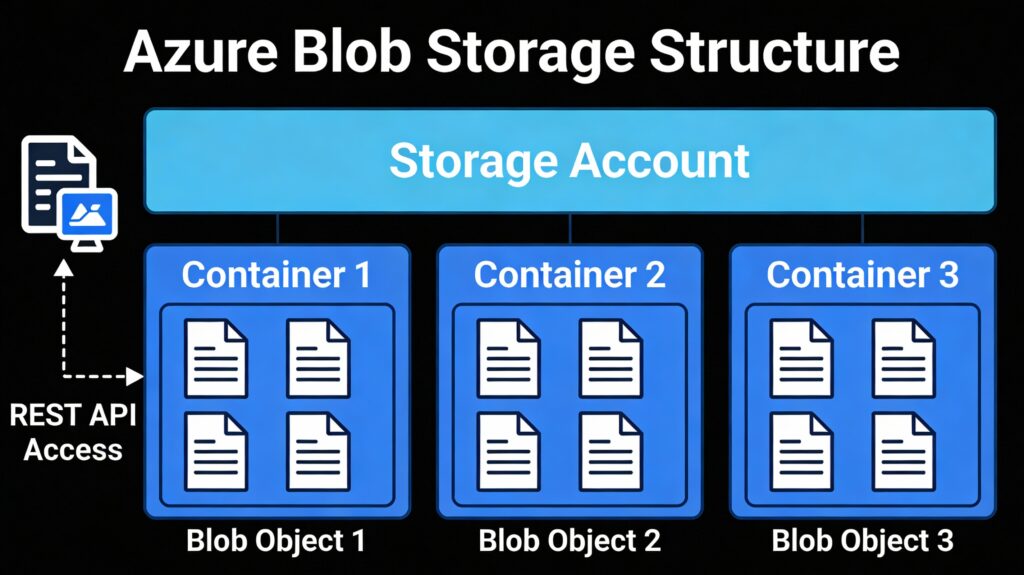
Azure Blob Storage operates on a hierarchical organizational model comprising three essential components: storage accounts, containers, and blobs.
Storage Accounts serve as the top-level organizational unit, providing a unique namespace within Azure. Each storage account is assigned a unique Universal Resource Identifier (URI) following the pattern https://<account_name>.blob.core.windows.net. This URI serves as the gateway for accessing all data within that account. Storage accounts also define billing boundaries, redundancy options, and regional locality for stored data.
Containers act as logical organizational units similar to folders, grouping related blobs within a storage account. A single storage account can contain unlimited containers, and each container can hold unlimited blobs. Containers enable organization, security policies, and lifecycle management at the collection level.
Blobs are the actual data objects stored within containers. Each blob has a unique identifier—its name—which, combined with the container name and account name, creates a fully qualified URI. When you upload a file to Azure Blob Storage, it becomes a blob object accessible via REST APIs and Azure SDKs. Users access blobs through HTTP/HTTPS endpoints, making them globally accessible from any internet-connected application.
Azure Blob Storage Architecture
Types of Blobs in Azure Blob Storage
Azure Blob Storage supports three distinct blob types, each optimized for specific data access patterns and workload requirements.
Block Blobs
Block Blobs are optimized for storing large amounts of unstructured data like text and binary content. Block blobs partition data into manageable blocks (ranging from 64 KB to 100 MB), which can be uploaded, managed, and manipulated individually. This block-based architecture enables parallel uploads, efficient error recovery, and the ability to upload blobs larger than available memory.
Block blobs can store up to approximately 190.7 TiB of data, making them ideal for storing documents, images, videos, audio files, and database backups. The block-based approach enables resumable uploads—if an upload fails, only failed blocks need re-uploading rather than the entire file. Block blobs also support snapshots and versioning for data protection and recovery.
Append Blobs
Append Blobs are purpose-built for append-only workloads where data is only added to the end of the blob, never modified mid-stream. Like block blobs, append blobs are composed of blocks, but they’re optimized specifically for append operations. Once data is written to an append blob, it becomes immutable and cannot be modified—only appended or deleted.
Append blobs excel at logging scenarios where applications continuously stream log entries, metrics, and diagnostic data. Virtual machines, applications, and IoT devices can reliably append log data without risk of corruption or data loss from concurrent writes. This immutability provides compliance-friendly audit trails for regulatory requirements like HIPAA, GDPR, and SOX.
Page Blobs
Page Blobs are designed for random read-write access patterns and support random access to any 512-byte page within the blob. Page blobs can store up to 8 TiB of data and are optimized for scenarios requiring frequent updates to specific portions of the blob.
Page blobs primarily serve as virtual hard drives (VHDs) for Azure virtual machines. When you create or attach a managed disk to an Azure VM, that disk is backed by a page blob providing block-level storage. Page blobs also support incremental snapshots, enabling efficient backup and disaster recovery for VM disks by capturing only changed data between snapshots.
Azure Blob Storage Access Tiers
Azure Blob Storage provides four access tiers enabling cost optimization based on data access frequency and retention requirements. Choosing the appropriate tier balances storage costs against data access latency and retrieval expenses.
Hot Tier
The Hot Tier is optimized for frequently accessed data requiring immediate availability. This tier has the highest storage costs but the lowest data access and transaction costs, making it ideal for active application data, real-time analytics datasets, and frequently accessed content.
Hot Tier is appropriate for production databases, active websites, frequently accessed media streams, and current business analytics. Data should be stored in Hot tier only when accessed regularly, as the higher per-GB storage cost quickly becomes expensive for rarely-accessed data.
Cool Tier
The Cool Tier is designed for infrequently accessed data that still requires fast retrieval. Compared to Hot tier, Cool Tier has significantly lower storage costs (approximately 40-50% less) but higher data retrieval costs. Microsoft requires data to be stored in Cool tier for a minimum of 30 days to avoid early deletion charges.
Cool Tier suits infrequently accessed backups, archived transaction logs, compliance records accessed occasionally, and historical data kept for reference. The tier provides fast retrieval without the premium pricing of Hot tier, offering excellent cost-efficiency for data that doesn’t need immediate access.
Cold Tier
The Cold Tier provides even lower storage costs than Cool tier, designed for rarely accessed data that still requires rapid retrieval. Cold Tier data must be retained for a minimum of 90 days. Retrieval costs exceed both Hot and Cool tiers, but storage costs are significantly lower.
Cold Tier is appropriate for long-term compliance archives, disaster recovery backups accessed rarely, seasonal business data, and historical records. Organizations with strict archival requirements but periodic audit needs benefit from Cold tier’s storage-cost efficiency.
Archive Tier
The Archive Tier offers the lowest storage costs (up to 80% cheaper than Hot tier) but the highest retrieval costs and longest latency. Archive is an offline tier where data rehydration (retrieval) requires hours and incurs substantial retrieval charges. Archive tier requires minimum 180-day retention.
Archive Tier suits historical data required for compliance, long-term backups accessed quarterly or annually, and data maintained solely for regulatory requirements. Organizations should use Archive tier only when data retrieval is infrequent and retrieval delays of hours are acceptable.
Key Features of Azure Blob Storage
Scalability and Durability: Azure Blob Storage automatically scales to accommodate data volumes from megabytes to petabytes without requiring capacity planning or manual provisioning. Microsoft ensures 99.99% durability through automatic data replication across multiple storage nodes and availability zones.
Security and Encryption: Data is automatically encrypted at rest using 256-bit AES encryption (Microsoft-managed keys by default). Organizations can use customer-managed keys stored in Azure Key Vault for additional security control. All data in transit is encrypted using HTTPS and TLS protocols.
Lifecycle Management: Organizations can define policies automatically transitioning blobs between access tiers based on age or access patterns. For example, policies can move blobs from Hot to Cool tier after 30 days, then to Archive after 90 days, optimizing costs without manual intervention.
Integration with Azure Services: Azure Blob Storage integrates seamlessly with Azure Functions, Logic Apps, Azure Data Factory, HDInsight, Databricks, and other services. This integration enables building data processing pipelines, ETL workflows, and event-driven architectures.
High Availability and Redundancy Options: Organizations choose redundancy levels: Locally-Redundant Storage (LRS) for 99.9% durability, Zone-Redundant Storage (ZRS) for 99.9% availability across zones, Geo-Redundant Storage (GRS) for 99.99% durability across regions, and Read-Access Geo-Redundant Storage (RA-GRS) for disaster recovery with read access from secondary regions.
Azure Blob Storage vs File Storage vs Disk Storage
| Feature | Azure Blob Storage | Azure File Storage | Azure Disk Storage |
|---|---|---|---|
| Storage Type | Object storage for unstructured data | Managed file shares (SMB/NFS) | Block storage for VM disks |
| Access Protocol | REST APIs, Azure SDKs | SMB/NFS file protocols | Block-level I/O |
| Max Single Object Size | 190.7 TiB (block blobs) | 4 TiB (single file) | 65,536 GiB (ultra disks) |
| Primary Use Case | Media, backups, data lakes, archives | File sharing, legacy apps | VM persistent storage |
| Performance | High throughput, scalable | Moderate; shared file latency | High IOPS, low latency |
| Availability | 99.9%-99.99% (depends on redundancy) | 99.9%-99.95% | 99.5%-99.9% (SLA varies) |
| Redundancy Options | LRS, ZRS, GRS, RA-GRS | LRS, ZRS, GRS, RA-GRS | LRS, ZRS based on disk type |
| Data Access | Anonymous public access possible | Requires SMB authentication | VM-only access (private) |
| Pricing Model | Per GB stored + per access tier | Per GiB provisioned | Per disk size + snapshots |
| Typical Workload | Batch processing, streaming, analytics | Document sharing, backups | Databases, transactional apps |
Common Use Cases of Azure Blob Storage
Backup and Disaster Recovery: Organizations use Azure Blob Storage to store database backups, VM snapshots, and application backups with geo-replication for disaster recovery. Archive tier provides cost-effective long-term backup retention meeting compliance requirements.
Media Storage and Streaming: Video and audio platforms store media files in Azure Blob Storage, leveraging CDN integration for global content delivery. Streaming applications store media content inexpensively in Hot or Cool tiers based on viewing patterns.
Big Data and Analytics: Data lake architectures use Azure Blob Storage as the storage foundation, combining it with analytics engines like Databricks, HDInsight, and Azure Synapse. Raw data is ingested into storage, then processed by analytics services.
Data Lakes: Organizations build data lakes on Azure Blob Storage, storing structured and unstructured data from diverse sources. Data lakes serve as centralized repositories enabling analytics, machine learning, and business intelligence across enterprise data.
Application Data Storage: Web applications and microservices store user-generated content, documents, and configuration files in Azure Blob Storage, eliminating local storage limitations.
Security and Compliance in Azure Blob Storage
Encryption at Rest and in Transit: By default, Azure Blob Storage encrypts all data using 256-bit AES encryption with Microsoft-managed keys. Organizations can opt for customer-managed keys stored in Azure Key Vault for regulatory requirements. All data transmission uses HTTPS with TLS encryption.
Access Control (RBAC and SAS): Fine-grained access control leverages Role-Based Access Control (RBAC) through Azure Active Directory, enabling permissions like Storage Blob Data Reader, Storage Blob Data Contributor, and Storage Blob Data Owner. Alternatively, Shared Access Signatures (SAS) provide temporary, limited-scope access to specific blobs or containers with configurable expiration and IP restrictions.
Network Security Options: Organizations can restrict Azure Blob Storage access using firewalls, virtual network service endpoints, and private endpoints. These features ensure data is accessed only from authorized networks, preventing exposure to the public internet.
Compliance Standards: Azure Blob Storage meets stringent compliance requirements including GDPR, HIPAA, ISO 27001, SOC 2, and FedRAMP. Built-in encryption, audit logging, and versioning support regulatory mandates around data protection and retention.
Pricing Model of Azure Blob Storage
Storage Costs by Tier: Pricing varies significantly by access tier. Hot tier costs approximately $0.018-$0.023 per GB for the first 50 TB monthly, Cool tier costs approximately $0.01 per GB, Cold tier costs approximately $0.004 per GB, and Archive tier costs approximately $0.001 per GB. Volume discounts apply at higher consumption levels.
Data Access and Transaction Costs: Beyond storage, Azure Blob Storage charges for operations (read, write, delete) typically $0.005-$0.013 per 10,000 operations depending on tier. Data retrieval from Cool, Cold, and Archive tiers incurs additional charges ($0.01-$0.02 per GB retrieval), while Hot tier retrieval is free.
Data Transfer Considerations: Ingress (data entering Azure) is free; egress (data leaving Azure) costs approximately $0.09 per GB in most regions. Intra-region data transfer is often free, but inter-region transfer incurs standard bandwidth charges.
Cost Optimization Best Practices: Define lifecycle policies automatically moving data to cooler tiers as it ages. Monitor access patterns and adjust tier assignments accordingly. Leverage compression for data already stored to reduce transfer and storage costs. Use Reserved Capacity plans for predictable workloads offering up to 36% savings.
Advantages and Limitations of Azure Blob Storage
Advantages of Azure Blob Storage
- Massive Scalability: Store unlimited data without capacity concerns or performance degradation
- Cost-Effective: Multiple access tiers enable optimal cost-performance trade-offs
- High Durability: 99.9%-99.99% durability through automatic replication protects against data loss
- Security-First: Encryption by default, RBAC integration, and compliance with industry standards
- Global Accessibility: Data accessible globally via HTTP/HTTPS with CDN integration
- Flexible Redundancy: Choose replication strategies matching business continuity requirements
- Lifecycle Management: Automate data transitions between tiers, optimizing costs over time
- Integration: Seamless integration with Azure ecosystem enables powerful data pipelines
Limitations of Azure Blob Storage
- Eventual Consistency: Blob changes may take seconds to propagate across all replicas; strong consistency isn’t guaranteed
- No Hierarchical Filesystem: Flat namespace requires applications to implement virtual folder structures
- Archive Retrieval Delays: Archive tier requires hours for data retrieval and prioritizes operational overhead
- Limited Query Capabilities: Cannot query blob contents directly; must retrieve entire objects
- Metadata Limitations: Blob metadata limited to 8 KB; complex attributes require external databases
- Performance at Extreme Scale: Some edge cases with millions of simultaneous connections may experience throttling
- Regional Latency: Geo-replicated data introduces read latency when accessing secondary regions
When Should You Use Azure Blob Storage?
Ideal Scenarios: Use Azure Blob Storage when storing unstructured data (images, videos, documents), building data lakes, maintaining compliance archives, hosting media content, backing up virtual machines and databases, enabling big data analytics workloads, or managing machine learning training datasets.
When It May Not Be the Best Fit: Avoid Azure Blob Storage for applications requiring strong consistency (use relational databases instead), requiring real-time query capabilities (use Azure SQL or Synapse), needing hierarchical file sharing (use Azure Files), or requiring block-level VM storage (use Azure Disks).
Conclusion
Azure Blob Storage is Microsoft’s enterprise-grade solution for storing massive volumes of unstructured data in the cloud. Its combination of scalability, cost-effectiveness through multiple access tiers, robust security features, and deep integration with Azure services makes it the foundation for modern data architectures. Whether you’re archiving compliance data, streaming media globally, enabling data lake analytics, or backing up critical infrastructure, Azure Blob Storage provides the reliability, performance, and flexibility needed for demanding cloud workloads.
Understanding access tiers, blob types, and security considerations enables architects and engineers to design storage solutions optimizing both performance and cost. With lifecycle policies automating tier transitions and redundancy options supporting business continuity, Azure Blob Storage serves as the storage backbone for organizations of all sizes pursuing cloud transformation and data-driven decision-making.
FAQs
Azure Blob Storage stores massive amounts of unstructured data including images, videos, documents, logs, and backups. It’s ideal for data lakes, media streaming, disaster recovery, compliance archival, and big data analytics. Organizations use Azure Blob Storage as their primary unstructured data repository in cloud environments.
Yes, Azure Blob Storage is Microsoft’s object storage service. Unlike file storage or block storage, object storage treats each data unit as a discrete object with metadata accessible via REST APIs. Azure Blob Storage uses a flat namespace where objects (blobs) are organized into containers, enabling massive scalability and cost-effective storage.
Azure Blob Storage provides enterprise-grade security with automatic 256-bit AES encryption at rest, HTTPS/TLS encryption in transit, RBAC integration with Azure AD, shared access signatures for fine-grained permissions, network firewalls, private endpoints, and support for compliance standards like GDPR, HIPAA, and ISO 27001.
Azure Blob Storage is object storage for unstructured data (images, videos, documents) accessed via REST APIs. Azure File Storage (Azure Files) provides managed file shares using SMB/NFS protocols for file sharing across multiple machines. Choose Blob Storage for unstructured data and File Storage for shared file access.
Archive tier is the cheapest for storage at approximately $0.001 per GB monthly, but it incurs high retrieval costs and requires hours for data rehydration. Cool tier ($0.01/GB) balances cost and accessibility for infrequently accessed data. Select tiers based on access patterns, not storage cost alone.
Azure Blob Storage supports four access tiers: Hot (frequent access, highest storage cost, lowest retrieval cost), Cool (infrequent access, 30-day minimum), Cold (rare access, 90-day minimum), and Archive (long-term storage, highest retrieval cost, 180-day minimum). Lifecycle policies automate transitions between tiers.
Comments