
Cloud migration has evolved from a nice-to-have technology initiative to a business imperative. With 94% of enterprise organizations now using cloud services and the global cloud computing market reaching $912.77 billion in 2025, the question for most businesses isn’t whether to migrate—it’s how to migrate successfully.
Yet despite the compelling benefits of cloud computing—including 20-30% cost savings compared to on-premises infrastructure, 32% operational efficiency gains, and 25% scalability improvements—cloud migration remains a complex undertaking fraught with challenges. According to recent industry data, 61% of migration projects exceed planned timelines by 40-100%, while 69% of IT leaders report budget overruns.
This comprehensive guide examines the most critical cloud migration challenges facing organizations in 2025, from cost overruns and security vulnerabilities to data loss risks and integration complexities. More importantly, it provides actionable strategies, proven best practices, and real-world solutions to help your organization navigate these obstacles successfully.
Whether you’re planning your first cloud migration, managing a complex multi-cloud transformation, or seeking to optimize your existing cloud environment, this guide equips you with the knowledge and tools needed to overcome migration challenges and unlock the full potential of cloud computing.
Understanding Cloud Migration: The Foundation
Before diving into challenges, it’s essential to establish a common understanding of cloud migration and why organizations pursue it despite the complexities.
What Is Cloud Migration?
Cloud migration is the process of moving data, applications, workloads, and IT infrastructure from on-premises data centers to cloud-based environments—or from one cloud platform to another. This transformation can involve public clouds (AWS, Microsoft Azure, Google Cloud), private clouds (dedicated infrastructure), or hybrid cloud architectures that combine both.
Common Migration Types:
- Full Cloud Migration: Moving all systems and data to the cloud
- Partial Migration: Migrating select applications while retaining some on-premises
- Hybrid Approach: Maintaining both cloud and on-prem infrastructure
- Multi-Cloud Strategy: Distributing workloads across multiple cloud providers
- Cloud-to-Cloud Migration: Moving between different cloud platforms
Why Organizations Migrate to the Cloud
Despite the challenges, the business case for cloud migration remains compelling:
Cost Optimization (48% of CIOs cite as top reason)
- Reduce capital expenditure on hardware and data centers
- Convert fixed IT costs to variable, pay-as-you-go models
- Achieve 20-30% cost savings compared to on-premises infrastructure
Digital Transformation (81% of CIOs see as essential)
- Enable modern application architectures and microservices
- Accelerate time-to-market by 20% for new services
- Support remote work and distributed teams
Scalability and Flexibility
- Scale resources up or down based on demand
- Access virtually unlimited computing power
- Improve infrastructure scalability by 30%
Operational Efficiency (32% post-migration boost)
- Reduce downtime by 35%
- Enable 30% faster decision-making through cloud analytics
- Free IT teams from infrastructure management
Resilience and Business Continuity
- Leverage cloud provider redundancy and disaster recovery
- Ensure high availability across geographic regions
- Minimize single points of failure
The Complete Landscape of Cloud Migration Challenges
Understanding the full spectrum of migration challenges is the first step toward addressing them effectively. Let’s examine the critical obstacles organizations face.
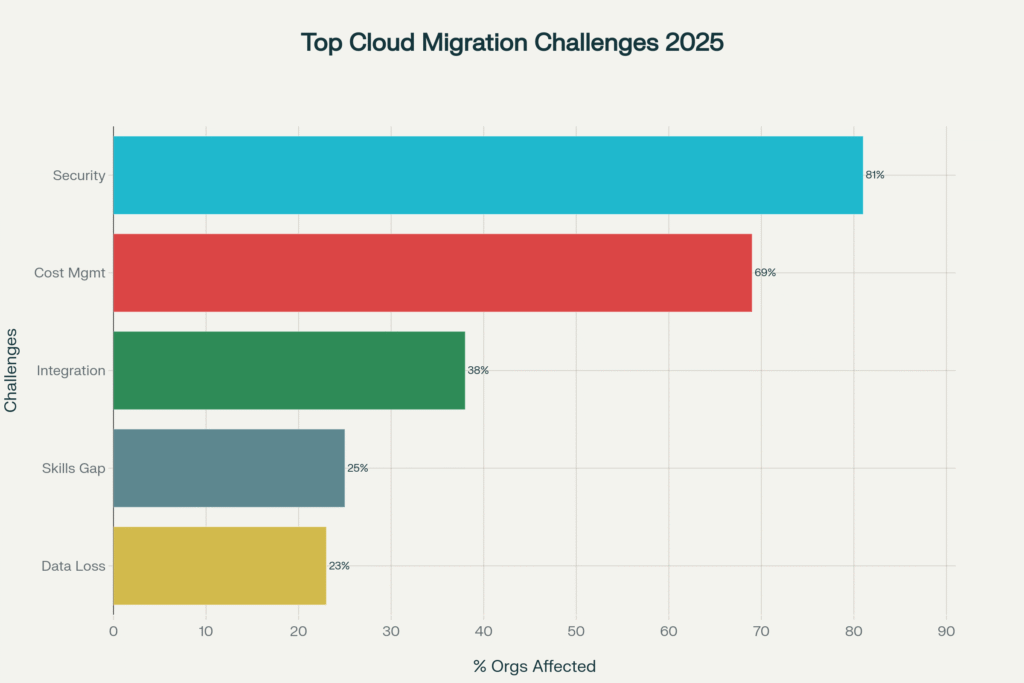
Percentage of organizations reporting each challenge during cloud migration, highlighting security and cost management as the most critical concerns
Challenge #1: Cost Management and Budget Overruns
The Problem: Perhaps the most prevalent challenge, 69% of IT leaders experience budget overruns during cloud migration, with 50% citing spend management as their top challenge. Organizations often underestimate the total cost of migration and ongoing cloud operations.
Why It Happens:
📊 Incomplete Cost Assessment
- Focusing only on obvious costs (compute, storage) while missing hidden expenses
- Underestimating data transfer fees ($0.02-$0.09 per GB adds up quickly)
- Failing to account for parallel running costs during transition periods
💰 Unexpected Charges
- Cross-region data transfer fees (one company incurred $24K in 3 hours during an outage)
- API call charges that accumulate with high-volume applications
- Premium support fees and enhanced security features
- Licensing complexities and compliance audits
⏱️ Extended Migration Timelines
- 61% of projects exceed timelines by 40-100%, doubling costs
- Maintaining both on-prem and cloud infrastructure simultaneously
- Repeated migration attempts due to inadequate planning
| Cost Category | Typical Range | Hidden Costs Risk | % of Projects Affected |
|---|---|---|---|
| Initial Assessment & Planning | $50K – $200K | Low | 100% |
| Data Transfer Fees | $0.02 – $0.09 per GB | High | 89% |
| Downtime & Lost Productivity | $5,600/minute | Critical | 85% |
| Security & Compliance | $100K – $500K | Medium | 81% |
| Training & Change Management | $25K – $150K | Medium | 75% |
| Integration & Customization | $75K – $300K | High | 52% |
| Testing & Optimization | $40K – $150K | Medium | 100% |
| Ongoing Service Fees (Annual) | 20-30% of on-prem costs | High | 100% |
Solutions and Best Practices:
✅ Conduct Comprehensive Cost Analysis
- Use cloud cost calculators from AWS, Azure, and Google Cloud
- Factor in all cost components: compute, storage, networking, support, training
- Model different usage scenarios (baseline, peak, growth projections)
- Include post-migration operational costs in TCO calculations
✅ Implement Cost Governance Early
- Establish spending limits and alerts before migration begins
- Use tagging strategies to track costs by department, project, or application
- Implement FinOps practices with dedicated cost optimization teams
- Schedule regular cost reviews (weekly during migration, monthly post-migration)
✅ Leverage Cloud Cost Optimization Tools
- IBM Turbonomic: Analyzes real-time resource needs and recommends optimal configurations
- CloudHealth, CloudCheckr, or native tools (AWS Cost Explorer, Azure Cost Management)
- Identify and eliminate unused resources, idle instances, and oversized VMs
- Take advantage of reserved instances, savings plans, and spot instances
✅ Plan for Parallel Infrastructure Costs
- Budget for the overlap period when both on-prem and cloud run simultaneously
- Minimize transition time to reduce double-dipping expenses
- Establish clear cutover dates for decommissioning on-prem systems
Real-World Example: A manufacturing company migrating to AWS initially budgeted $800K but spent $1.4M due to unforeseen data egress charges and extended parallel infrastructure costs. After implementing tagging, rightsizing recommendations, and reserved instance purchasing, they reduced ongoing costs by 35%.
Challenge #2: Security Vulnerabilities and Compliance Risks
The Problem: 81% of organizations identify security as a top cloud challenge, with good reason. Cloud migration introduces new security paradigms, expanded attack surfaces, and complex compliance requirements.
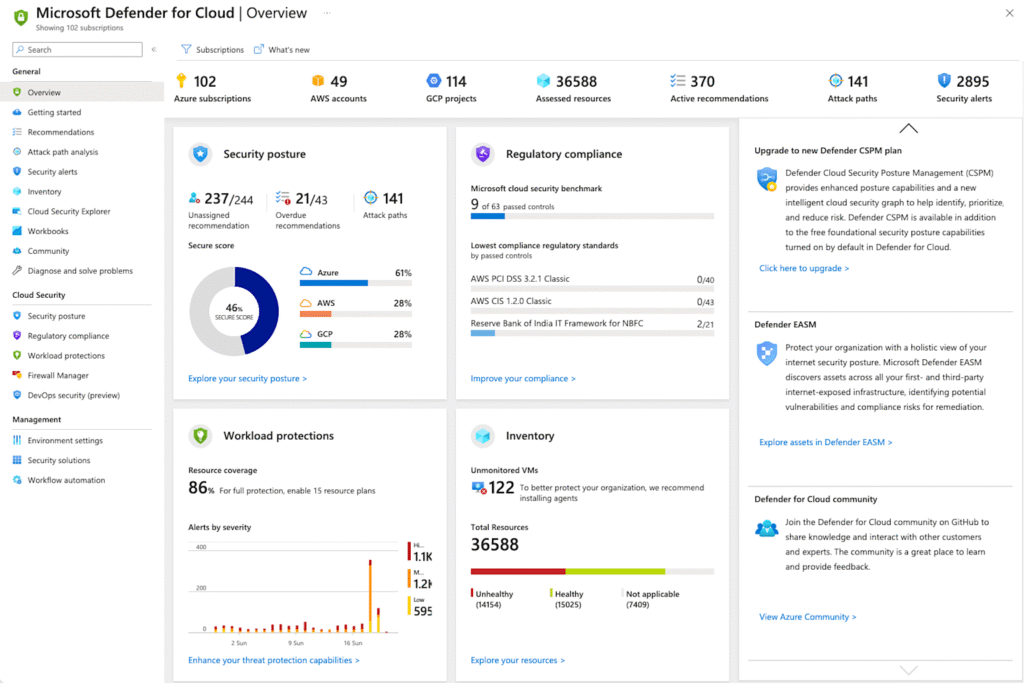
Microsoft Defender for Cloud dashboard showing security posture, compliance, alerts, and resource inventory across Azure, AWS, and GCP (Cloudchipr)
Critical Security Concerns:
🔓 Primary Operational Security Worries
- Account/service hijacking: 35% of organizations
- Malware and ransomware: 31%
- Privacy and data access issues (GDPR compliance): 31%
- Unauthorized access: 28%
- Nation-state attacks: 26%
🚨 Most Damaging Security Issues
- Misconfigurations cause 70% of cloud security breaches
- Data loss during migration affects 23% of organizations
- Average data breach cost: $4.45 million per incident
- Sensitive data exposure during transit: 31% of enterprise migrations
🔐 Compliance Complexity
- Navigating GDPR, HIPAA, PCI-DSS, SOC 2, and industry-specific regulations
- Data residency requirements across different jurisdictions
- Maintaining compliance during transition periods
- Documentation and audit trail requirements
| Security Challenge | % Reporting Issue | Solution Strategy | Implementation Complexity |
|---|---|---|---|
| Account/Service Hijacking | 35% | Multi-factor authentication, IAM policies | Medium |
| Malware & Ransomware | 31% | End-to-end encryption, regular security audits | High |
| Data Privacy & Access Control | 31% | Data classification, compliance frameworks | High |
| Misconfigurations | 70% of breaches | Automated security scanning, policy enforcement | Medium |
| Unauthorized Access | 28% | Least privilege access, continuous monitoring | Low |
| Data Loss During Transit | 23% | Encrypted transfer protocols, validation checks | Medium |
Solutions and Best Practices:
✅ Pre-Migration Security Assessment (Critical First Step)
- Conduct a comprehensive risk assessment, identifying vulnerabilities
- Classify data by sensitivity level (confidential, internal, public)
- Map all compliance requirements applicable to your industry
- Establish security baselines for measuring post-migration posture
✅ Implement Defense-in-Depth Strategy
Identity and Access Management (IAM)
- Enforce multi-factor authentication (MFA) for all user accounts
- Apply the principle of least privilege—grant minimum necessary permissions
- Implement role-based access control (RBAC) with regular audits
- Use temporary credentials and automated key rotation
Data Protection
- Encrypt data at rest using AES-256 or equivalent
- Encrypt data in transit with TLS 1.3 or higher
- Manage your own encryption keys for sensitive workloads
- Implement Data Loss Prevention (DLP) solutions
Network Security
- Leverage cloud-native security groups and firewalls
- Implement network segmentation to isolate critical resources
- Use Virtual Private Clouds (VPCs) with private subnets
- Monitor network traffic for suspicious patterns
✅ Automate Security Controls
- Use Infrastructure as Code (IaC) with security templates
- Implement automated security scanning in CI/CD pipelines
- Deploy cloud security posture management (CSPM) tools
- Enable real-time threat detection and response
✅ Continuous Monitoring and Auditing
- Implement centralized logging for all cloud resources
- Set up alerts for configuration changes and suspicious activities
- Conduct regular security audits (monthly minimum)
- Test incident response plans quarterly
✅ Choose Security-Focused Cloud Providers
- Verify provider certifications (SOC 2, ISO 27001, FedRAMP)
- Review the shared responsibility model, clearly defining boundaries
- Assess the provider’s security track record and incident response
- Ensure the provider supports compliance requirements for your industry
Security Checklist by Migration Phase:
Pre-Migration:
- ✅ Risk assessment and data classification completed
- ✅ Security strategy documented with clear ownership
- ✅ IAM frameworks designed and tested
- ✅ Encryption protocols established
- ✅ Backup and disaster recovery plans documented
During Migration:
- ✅ Secure transfer protocols with encryption active
- ✅ Real-time monitoring and logging configured
- ✅ Data integrity validation after each phase
- ✅ Access restricted to essential personnel only
- ✅ Security policies updated to reflect migration state
Post-Migration:
- ✅ Full security audit compared to the pre-migration baseline
- ✅ Compliance verification through control mapping
- ✅ Continuous monitoring and threat detection optimized
- ✅ Incident response plans tested in a cloud environment
- ✅ Team training on cloud-specific security practices
Partnering with Cloud Migration Experts: For organizations seeking specialized expertise in secure cloud migrations, working with experienced cloud migration companies can significantly reduce security risks and ensure compliance throughout the transition.
Challenge #3: Downtime and Business Disruption
The Problem: Migration-related downtime costs businesses an average of $5,600 per minute, with complex migrations causing 24-72 hours of disruption. For large enterprises, costs can reach $260,000 per hour.
Impact Areas:
💔 Revenue Loss
- E-commerce sites lose sales directly during downtime
- SaaS companies face service-level agreement (SLA) penalties
- Manufacturing operations halt, affecting production targets
😞 Customer Dissatisfaction
- User frustration with service unavailability
- Negative social media sentiment and brand damage
- Customer churn to competitors offering better reliability
📉 Productivity Loss
- Employees are unable to access critical applications
- Extended work hours to catch up post-disruption
- Delayed decision-making due to a lack of data access
⚠️ Extended Recovery Time
- Average downtime during migration: 24-72 hours for complex systems
- Additional time required for performance optimization
- Potential for cascading failures across integrated systems
Solutions and Best Practices:
✅ Implement Zero-Downtime Migration Strategies
Database Replication Approach
- Set up real-time replication between on-prem and cloud databases
- Run applications in parallel against both databases
- Gradually shift traffic to the cloud once validated
- Keep on-prem as a fallback until confidence is established
Blue-Green Deployment
- Maintain two identical environments (blue=production, green=new cloud)
- Migrate and test in the green environment without affecting the blue
- Switch traffic to green when ready (instant cutover)
- Keep blue as an immediate rollback option
Canary Releases
- Migrate a small percentage of users/traffic initially (5-10%)
- Monitor performance and gather feedback
- Gradually increase traffic as confidence grows
- Roll back quickly if issues are detected
✅ Strategic Timing and Scheduling
- Schedule migrations during off-peak hours (nights, weekends)
- Avoid busy seasons (holiday retail, tax season for finance)
- Communicate maintenance windows clearly to stakeholders
- Build buffer time for unexpected complications
✅ Comprehensive Testing Before Cutover
- Conduct dry-run migrations in non-production environments
- Perform load testing to ensure the cloud environment handles peak traffic
- Test disaster recovery and rollback procedures
- Validate all integrations and dependencies
✅ Prepare Detailed Rollback Plans
- Document step-by-step rollback procedures
- Establish clear decision criteria for triggering rollback
- Assign roles and responsibilities for the rollback team
- Test rollback procedures before production migration
✅ Phased Migration Approach
- Migrate non-critical applications first to gain experience
- Learn from initial migrations to refine the process
- Tackle mission-critical systems last with proven methodology
- Allow time between phases for stabilization
Downtime Minimization Case Study: A financial services firm migrated its customer portal using a blue-green deployment strategy. They conducted three dry-run migrations, identified and resolved performance bottlenecks, and executed the final migration during a 4-hour maintenance window. Actual downtime: 12 minutes—far below the industry average.
Challenge #4: Data Migration Complexity and Data Loss Risk
The Problem: Data migration affects 89% of businesses moving to cloud platforms, with 23% experiencing some data loss during migration. Global data is expected to reach 200 zettabytes by 2025, making data migration increasingly complex.
Data Migration Obstacles:
📊 System Compatibility Issues
- Legacy data formats clash with modern cloud platforms
- Causes up to 45% of migration failures
- Requires extensive data transformation and mapping
🔀 Data Volume and Complexity
- Global data creation: 463 exabytes daily
- Large volumes demand more time and resources
- Complex data structures require specialized migration tools
- Increases migration time by 40-60% when not managed properly
🗑️ Poor Data Quality
- Affects 84% of migrations
- Duplicate, outdated, or corrupted data is causing system issues
- Incorrect business decisions based on flawed data
- Increased storage costs from unnecessary data
🔌 Application Integration Challenges
- 52% of existing applications cannot access migrated data without modification
- Application downtime and functionality disruptions
- Additional development costs for compatibility updates
📦 Storage Planning Errors
- 47% of organizations over-provision cloud storage by 30-50%
- 23% face unexpected storage limitations
- Both scenarios lead to cost issues or migration delays
Solutions and Best Practices:
✅ Pre-Migration Data Assessment and Cleansing
Data Inventory and Classification
- Catalog all data sources and types
- Identify critical vs. non-critical data
- Classify by sensitivity and compliance requirements
- Map data dependencies and relationships
Data Quality Improvement
- Eliminate duplicates (deduplication)
- Remove ROT data (Redundant, Obsolete, Trivial)
- Correct formatting inconsistencies
- Validate data accuracy through sampling
- AI-powered tools can eliminate up to 70% of unnecessary data
Archive Unnecessary Data
- Migrate only data accessed within the last 2-3 years
- Archive older data that’s rarely accessed
- Maintain compliance with retention requirements
- Reduce migration scope by 30-50% typically
✅ Choose the Right Migration Tools and Methods
Migration Tool Selection
- AWS Database Migration Service (DMS): For AWS migrations with minimal downtime
- Azure Database Migration Service: Native Azure migrations with assessment tools
- Google Cloud Migration Tools: BigQuery migration service, Transfer Service
- Third-party tools: Cloudficient, ShareArchiver, Informatica for complex scenarios
Migration Methods
- Offline Migration: Bulk transfer during maintenance window (fastest for large datasets)
- Online Migration: Continuous replication with minimal downtime (best for critical systems)
- Hybrid Approach: Combine bulk initial load with ongoing incremental sync
✅ Implement Robust Data Protection
Multi-Layer Backup Strategy
- Create complete backups before migration begins
- Maintain backups at multiple stages throughout migration
- Store backups in a separate location from the migration target
- Test backup restoration procedures before production migration
Data Validation and Verification
- Use checksums to verify data integrity after transfer
- Perform row counts and data sampling comparisons
- Validate application functionality with migrated data
- Conduct user acceptance testing (UAT) before decommissioning the source
Rollback Capability
- Maintain source systems operational until validation is complete
- Document rollback procedures for each migration phase
- Establish clear criteria for declaring migration successful
- Plan for a minimum of 30-day parallel operations for critical systems
✅ Phased Migration for Large Datasets
- Divide data into logical chunks (by date range, business unit, etc.)
- Migrate in phases to minimize risk exposure
- Validate each phase before proceeding to the next
- Learn and adjust the approach based on early phase results
✅ Address Legacy System Compatibility
- 73% of enterprises rely on 10+ year old systems
- Conduct a compatibility assessment before migration
- Refactor or re-platform applications as needed
- Use middleware or data transformation layers when necessary
- Consider retiring legacy systems that can’t be modernized
Data Migration Success Story: A healthcare organization used AI-powered data classification to reduce migration scope by 65%, eliminating unnecessary data. They implemented automated validation checks at each stage, achieving zero data loss across 12 TB of patient records while maintaining HIPAA compliance.
Challenge #5: Legacy System Integration and Technical Complexity
The Problem: Organizations with complex existing IT architectures face significant challenges. 73% of enterprises still rely on systems over 10 years old, creating substantial compatibility barriers.
Integration Challenges:
🔧 Architectural Complexity
- Intricate dependencies between applications and infrastructure
- Difficult to identify and document all interconnections
- Determining which systems must be collocated for performance
- Legacy protocols are incompatible with cloud-native services
🔌 Integration Requirements
- 38% of organizations struggle with integration
- Connecting cloud services to the remaining on-premises systems
- API limitations or a lack of modern integration capabilities
- Real-time data sync requirements between hybrid environments
⚙️ Technical Debt
- Undocumented customizations and workarounds
- Hard-coded configurations specific to the on-prem environment
- Proprietary protocols or outdated technology stacks
- Limited vendor support for legacy systems
Solutions and Best Practices:
✅ Comprehensive Discovery and Dependency Mapping
- Use application dependency mapping (ADM) tools
- Document all system interconnections and data flows
- Identify performance requirements and latency sensitivities
- Map out authentication and authorization dependencies
✅ Choose Appropriate Migration Strategy
| Strategy | Description | Speed | Cost | Best For |
|---|---|---|---|---|
| Rehosting (Lift & Shift) | Move apps to cloud without changes | Fast (weeks-months) | Lower initial cost | Quick migration, minimal disruption |
| Replatforming | Minor optimizations during migration | Moderate (2-4 months) | Moderate | Some optimization needed |
| Refactoring/Re-architecting | Rebuild apps for cloud-native architecture | Slow (6-12+ months) | Highest | Maximum cloud benefits, scalability |
| Repurchasing | Move to SaaS alternatives | Fast (4-8 weeks) | Subscription-based | Legacy apps with SaaS alternatives |
| Retiring | Decommission unnecessary apps | Fastest (immediate) | Cost savings | Unused/redundant applications |
| Retaining (Hybrid) | Keep some apps on-premises | Phased approach | Varies | Regulatory or performance constraints |
✅ Implement Integration Middleware
- Use an enterprise service bus (ESB) or an integration platform as a service (iPaaS)
- Deploy API gateways for standardized connectivity
- Implement message queues for asynchronous communication
- Use VPN or dedicated connections (AWS Direct Connect, Azure ExpressRoute) for secure hybrid connectivity
✅ Modernize Strategically
- Assess each legacy system for cloud compatibility
- Refactor applications with the most business value first
- Consider containerization (Docker, Kubernetes) for portability
- Evaluate SaaS replacements for commodity applications
✅ Maintain Hybrid Infrastructure Temporarily
- Accept that not everything migrates immediately
- Build a robust hybrid cloud architecture
- Use cloud management platforms for unified visibility
- Plan a long-term strategy for remaining on-prem systems
Challenge #6: Skills and Expertise Gaps
The Problem: 25% of organizations face IT, database, or AI-based skill gaps during migration, while 76% of organizations report a shortage of skilled cybersecurity professionals.
Skill Gap Manifestations:
👥 Technical Skills Deficits
- Lack of cloud architecture expertise
- Limited experience with specific cloud platforms (AWS, Azure, GCP)
- Insufficient knowledge of cloud-native services and tools
- Security skills not adapted to cloud environments
📚 Knowledge Gaps
- Understanding cloud pricing models and cost optimization
- Implementing proper IAM and security controls
- Designing for cloud scalability and resilience
- Navigating compliance in cloud contexts
⚡ Operational Challenges
- Difficulty troubleshooting cloud-specific issues
- Inefficient use of cloud services and features
- Prolonged learning curves are impacting project timelines
- Over-reliance on external consultants
Solutions and Best Practices:
✅ Invest in Training and Certification
- AWS Certified Solutions Architect, Azure Administrator, Google Cloud Professional
- Security certifications (CCSP, AWS Security Specialty)
- FinOps Certified Practitioner for cost management
- Hands-on labs and sandbox environments for practice
✅ Build Center of Excellence (CoE)
- Establish a dedicated cloud team with deep expertise
- Create internal best practices and playbooks
- Provide mentorship for the broader IT organization
- Share knowledge through lunch-and-learns, workshops
✅ Partner with Experienced Providers
- Engage the cloud service provider support and professional services
- Work with specialized cloud migration companies for complex migrations
- Use managed services for specialized capabilities
- Leverage consulting during initial phases, transfer knowledge to internal teams
✅ Hire Cloud-Specialized Talent
- Recruit experienced cloud architects and engineers
- Consider remote hiring to access a broader talent pool
- Offer competitive compensation for in-demand skills
- Create career development paths for cloud roles
✅ Foster Culture of Continuous Learning
- Allocate time and budget for ongoing education
- Encourage experimentation in development environments
- Reward team members who achieve certifications
- Stay current with cloud platform updates and new services
Challenge #7: Performance Optimization and Monitoring
The Problem: Poorly optimized migrations lead to performance degradation, requiring additional compute resources and tuning post-migration. Organizations report needing 35% operational efficiency gains to justify migration ROI.
Performance Issues:
⚠️ Common Performance Problems
- Latency increases due to geographic distance from cloud regions
- Resource contention in multi-tenant cloud environments
- Inefficient database queries are not optimized for the cloud
- Network bottlenecks between cloud and on-premises systems
📊 Monitoring Challenges
- 49% cite lack of visibility as a major barrier to cloud adoption
- Different monitoring tools for cloud vs. on-prem
- Difficulty establishing performance baselines
- Alert fatigue from misconfigured monitoring
Solutions and Best Practices:
✅ Establish Performance Baselines
- Document current on-premises performance metrics
- Define acceptable performance targets for the cloud
- Use tools like IBM Instana to capture pre-migration baselines
- Set clear SLAs for post-migration performance
✅ Optimize Cloud Resource Configuration
- Right-size VMs based on actual utilization (not on-prem specs)
- Use auto-scaling to handle variable demand
- Leverage managed services to reduce operational overhead
- Implement caching strategies (CDNs, Redis, CloudFront)
✅ Implement Comprehensive Monitoring
- Deploy cloud-native monitoring (CloudWatch, Azure Monitor, Stackdriver)
- Use APM tools for application performance insights
- Implement distributed tracing for microservices
- Set up real-time alerting with appropriate thresholds
✅ Continuous Performance Tuning
- Conduct regular performance reviews post-migration
- Identify and eliminate bottlenecks iteratively
- Test under realistic load conditions
- Optimize database indexes and queries for cloud environments
✅ Geographic Optimization
- Choose cloud regions closest to users and data sources
- Use content delivery networks (CDNs) for global reach
- Implement multi-region deployments for critical applications
- Consider edge computing for latency-sensitive workloads
Critical Success Factors: Migration Best Practices
Based on the challenges outlined above, here are the essential best practices that separate successful migrations (89% success rate) from failed ones.
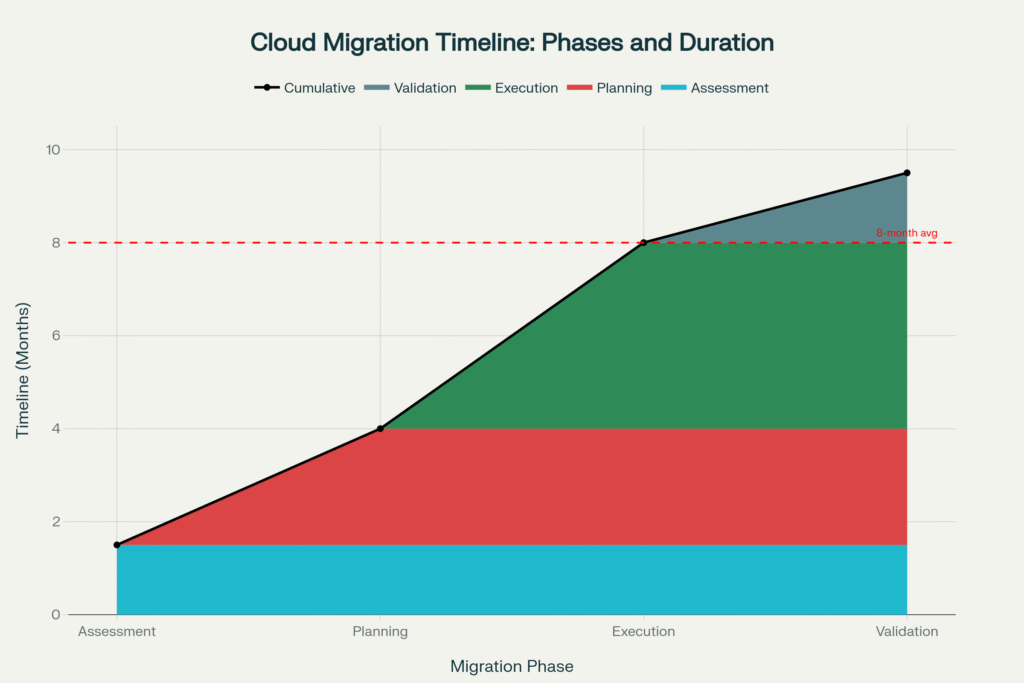
Typical cloud migration timeline showing the four major phases and their duration, with an average total migration time of 8-9 months for enterprise organizations
1. Develop a Comprehensive Migration Strategy
Why It Matters: Organizations without clear migration strategies face the highest failure rates. Lack of strategy is the #1 cloud migration challenge.
Key Components:
📋 Clear Goals and Success Metrics
- Define specific, measurable objectives (reduce costs by X%, improve performance by Y%)
- Establish KPIs for tracking progress (migration completion %, downtime hours, cost variance)
- Align migration goals with business objectives
- Create executive sponsorship and accountability
🗺️ Detailed Migration Roadmap
- Document which workloads migrate in which order
- Define dependencies and prerequisites for each phase
- Assign clear ownership and responsibilities
- Include realistic timelines with a buffer for issues
- Plan for the parallel operations period
🎯 Pilot Projects First
- Start with non-critical applications to gain experience
- Learn lessons and refine approach
- Build team confidence and capabilities
- Demonstrate value to stakeholders before tackling mission-critical systems
Migration Planning Checklist:
| Phase | Action Item | Owner |
|---|---|---|
| Assessment | Inventory all applications and data | IT Architecture Team |
| Assessment | Identify dependencies and integrations | Application Teams |
| Assessment | Assess current infrastructure costs | Finance + IT |
| Planning | Define migration goals and KPIs | Executive Leadership |
| Planning | Create a detailed migration roadmap | IT + Procurement |
| Planning | Conducta security risk assessment | Project Management |
| Security | Conduct a security audit | Security Team |
| Security | Classify data by sensitivity level | Data Governance |
| Security | Implement encryption protocols | Security + IT |
| Execution | Set up backup and disaster recovery | IT Operations |
| Execution | Execute migration in phases | Migration Team |
| Execution | Monitor performance continuously | DevOps Team |
| Validation | Verify data integrity post-migration | Data Quality Team |
| Validation | Conduct a security risk assessment | Security Team |
| Validation | Optimize configurations and costs | Cloud Operations |
2. Build the Right Team and Get Executive Support
Critical Team Roles:
- Migration Project Manager: Overall coordination and timeline management
- Cloud Architect: Design cloud infrastructure and migration approach
- Security Lead: Ensure security and compliance throughout
- Network Engineer: Handle connectivity and integration
- Database Administrator: Manage data migration and optimization
- Application Owners: Validate functionality of migrated applications
- FinOps Specialist: Monitor and optimize costs
Executive Sponsorship Requirements:
- Budget approval with contingency (20-30% buffer recommended)
- Authority to make decisions and resolve conflicts
- Regular communication with the organization about migration progress
- Commitment to change management and training investments
3. Prioritize Security at Every Stage
Security cannot be an afterthought. With 81% of organizations citing security as a top concern, integrate security into every phase.
Security Best Practices:
- Conduct a risk assessment before starting
- Implement encryption for data at rest and in transit
- Use multi-factor authentication and least-privilege access
- Deploy automated security scanning and monitoring
- Test incident response procedures in a cloud environment
- Maintain compliance with relevant regulations (GDPR, HIPAA, PCI-DSS)
- Schedule regular security audits throughout and after migration
4. Test Extensively Before Production Cutover
Testing Imperatives:
- Functional Testing: Verify applications work correctly in the cloud
- Performance Testing: Ensure cloud performance meets or exceeds baselines
- Security Testing: Conduct penetration testing and vulnerability assessments
- Integration Testing: Validate connections to remaining on-prem systems
- Disaster Recovery Testing: Test backup restoration and failover procedures
- User Acceptance Testing: Get end-user validation before full rollout
5. Plan for Change Management and Training
Technology migration is also an organizational change.
Change Management Essentials:
- Communicate early and often about migration plans and impact
- Provide role-specific training before systems change
- Create documentation and quick reference guides
- Establish support channels for post-migration questions
- Celebrate milestones and share success stories
- Gather feedback and address concerns promptly
6. Implement Robust Monitoring and Optimization
Migration doesn’t end at cutover—it’s the beginning of ongoing optimization.
Post-Migration Activities:
- Monitor performance against baselines continuously
- Review and optimize cloud costs monthly
- Right-size resources based on actual usage patterns
- Decommission on-prem infrastructure according to plan
- Document lessons learned for future migrations
- Establish cloud governance and best practices
Key Statistics: Cloud Migration in 2025
Understanding industry benchmarks helps set realistic expectations:
| Metric | Value/Percentage | Source Context |
|---|---|---|
| Organizations Using Cloud | 94% | Enterprise organizations |
| Cloud Market Size 2025 | $912.77 Billion | Global cloud computing market |
| Projected Market Size 2030 | $1+ Trillion | Projected growth |
| Average Migration Duration | 8 months (down from 12 in 2019) | Enterprise average (2023) |
| Migration Success Rate | 89% | With proper planning |
| Projects Exceeding Timeline | 61% (by 40-100%) | Without adequate strategy |
| Data Loss During Migration | 23% experience some loss | Organizations reporting |
| Security Breach Cost | $4.45 Million per incident | Average data breach cost |
| Post-Migration Efficiency Gain | 32% operational efficiency | Post-migration improvement |
| Cost Savings vs On-Premises | 20-30% | Compared to on-prem infrastructure |
Real-World Success Stories
Financial Services Firm: Zero-Downtime Migration
A regional bank migrated customer-facing applications to AWS using blue-green deployment. They conducted three dry runs, implemented real-time database replication, and executed the final cutover during a planned maintenance window. Result: 12 minutes actual downtime (vs. 24-72 hours industry average), zero data loss, and 28% cost reduction.
Healthcare Organization: Data-Intensive Migration
A healthcare provider faced the challenge of migrating 12 TB of patient records while maintaining HIPAA compliance. They used AI-powered data classification to eliminate 65% of unnecessary data, implemented automated validation at each stage, and achieved zero data loss while reducing migration time by 40%.
Manufacturing Company: Cost Optimization
After the initial migration resulted in $600k budget overrun, the manufacturer implemented a tagging strategy, right-sizing recommendations, and reserved instance purchasing. They reduced ongoing monthly costs by 35%, achieving ROI payback in 14 months.
Retail Chain: Multi-Cloud Success
National retailer adopted a multi-cloud strategy (AWS for e-commerce, Azure for ERP) to avoid vendor lock-in. Despite complexity, a phased migration approach and strong governance resulted in 25% scalability improvement, 30% faster time-to-market for new features, and successful integration of 127 applications.
Choosing the Right Cloud Migration Partner
While some organizations successfully manage migrations in-house, many benefit from partnering with experienced providers.
When to Consider External Help:
- ✓ Limited internal cloud expertise
- ✓ Complex, mission-critical applications
- ✓ Aggressive timelines requiring dedicated focus
- ✓ Need for specialized security or compliance capabilities
- ✓ Desire to transfer knowledge while executing migration
What to Look For:
- Proven track record with similar migrations
- Relevant cloud platform certifications
- Industry-specific experience (if applicable)
- Transparent pricing and clear scope of work
- Knowledge transfer and training included
- Ongoing support post-migration
For organizations seeking expert guidance, exploring specialized cloud migration companies can provide access to proven methodologies, experienced teams, and accelerated timelines while reducing risks.
Emerging Trends in Cloud Migration
AI-Powered Migration Tools
- Growing at 28% annually
- Automated discovery and dependency mapping
- Intelligent workload placement recommendations
- Predictive analytics for capacity planning
Containerization and Kubernetes
- Increasing adoption of portability across clouds
- Simplifies migration and reduces vendor lock-in
- Enables microservices architectures
- Growing use of managed Kubernetes services (EKS, AKS, GKE)
Edge Computing Integration
- Edge-to-cloud architectures are accelerating from 1% in 2023 to 25% in 2024
- Hybrid edge-cloud for latency-sensitive applications
- Distributed data processing closer to sources
- 5G enabling real-time edge-cloud integration
FinOps and Cost Optimization
- Dedicated cost optimization practices are gaining traction
- Real-time cost visibility and anomaly detection
- Automated resource rightsizing
- Chargeback/showback models for accountability
Multi-Cloud and Hybrid Cloud
- 89% of organizations adopt multi-cloud strategies
- 80% maintain hybrid cloud environments
- Best-of-breed approach for different workload types
- Cloud management platforms for unified operations
Conclusion: Navigating Cloud Migration Successfully
Cloud migration remains one of the most transformative IT initiatives organizations undertake. While challenges are real—from cost overruns affecting 69% of projects to security concerns worrying 81% of organizations—they are far from insurmountable.
Key Takeaways:
🎯 Success Starts with Strategy
- Organizations with comprehensive migration plans achieve 89% success rates
- Clear goals, detailed roadmaps, and executive sponsorship are non-negotiable
- Pilot projects build capability before tackling mission-critical systems
💰 Cost Management Requires Vigilance
- Budget for 20-30% contingency beyond initial estimates
- Implement cost governance from day one
- Use cloud-native tools and FinOps practices for optimization
- Remember: migration is an investment with 20-30% ongoing savings
🔒 Security Cannot Be an Afterthought
- Conduct comprehensive risk assessments pre-migration
- Implement defense-in-depth with encryption, IAM, and monitoring
- Automate security controls to prevent misconfigurations
- Choose cloud providers with strong security track records
📊 Data Migration Demands Rigor
- Clean and classify data before migration
- Implement multi-layer backup and validation strategies
- Use specialized tools for complex data transformations
- Accept that eliminating 30-70% of unnecessary data accelerates migrations
⏱️ Minimize Downtime Through Planning
- Use zero-downtime strategies (blue-green, database replication)
- Schedule migrations during off-peak hours
- Test extensively before production cutover
- Maintain detailed rollback procedures
👥 Invest in People and Skills
- Train existing teams or hire cloud-specialized talent
- Build internal Centers of Excellence
- Partner with experienced providers for knowledge transfer
- Foster a culture of continuous learning
📈 Optimization Is Ongoing
- Migration doesn’t end at cutover
- Monitor performance and costs continuously
- Right-size resources based on actual usage
- Document lessons learned for future migrations
The Bottom Line: Cloud migration is challenging but achievable. With 94% of enterprises now using cloud services and migration success rates reaching 89%, the path forward is well-trodden. Organizations that approach migration strategically—with comprehensive planning, adequate resources, security focus, and realistic timelines—consistently achieve the promised benefits: lower costs, improved agility, and competitive advantage.
The question is no longer whether to migrate to the cloud, but how to do so successfully. By understanding the challenges outlined in this guide and implementing proven best practices, your organization can navigate the complexities of cloud migration and emerge with a modern, scalable, cost-effective IT infrastructure positioned for future growth.
Ready to begin your cloud migration journey? Start with a comprehensive assessment, build your strategy, assemble the right team—and remember that help is available when you need it. The cloud’s transformative potential awaits those who approach it with preparation, expertise, and determination.
Comments