
What Is a GPU Server Cluster and Why Does It Matter?
As artificial intelligence, high-performance computing (HPC), and data analytics workloads continue to scale, traditional CPU servers can no longer keep up. Enter GPU server clusters, distributed systems built to deliver parallel computing power at scale. These clusters combine multiple GPU nodes to accelerate deep learning, 3D rendering, scientific simulations, and large-scale data processing with unmatched efficiency.
Whether you’re an enterprise deploying AI models in production or a researcher working with massive datasets, understanding how GPU clusters function and how to optimize them can dramatically improve performance and cost efficiency.
Executive summary (TL;DR)
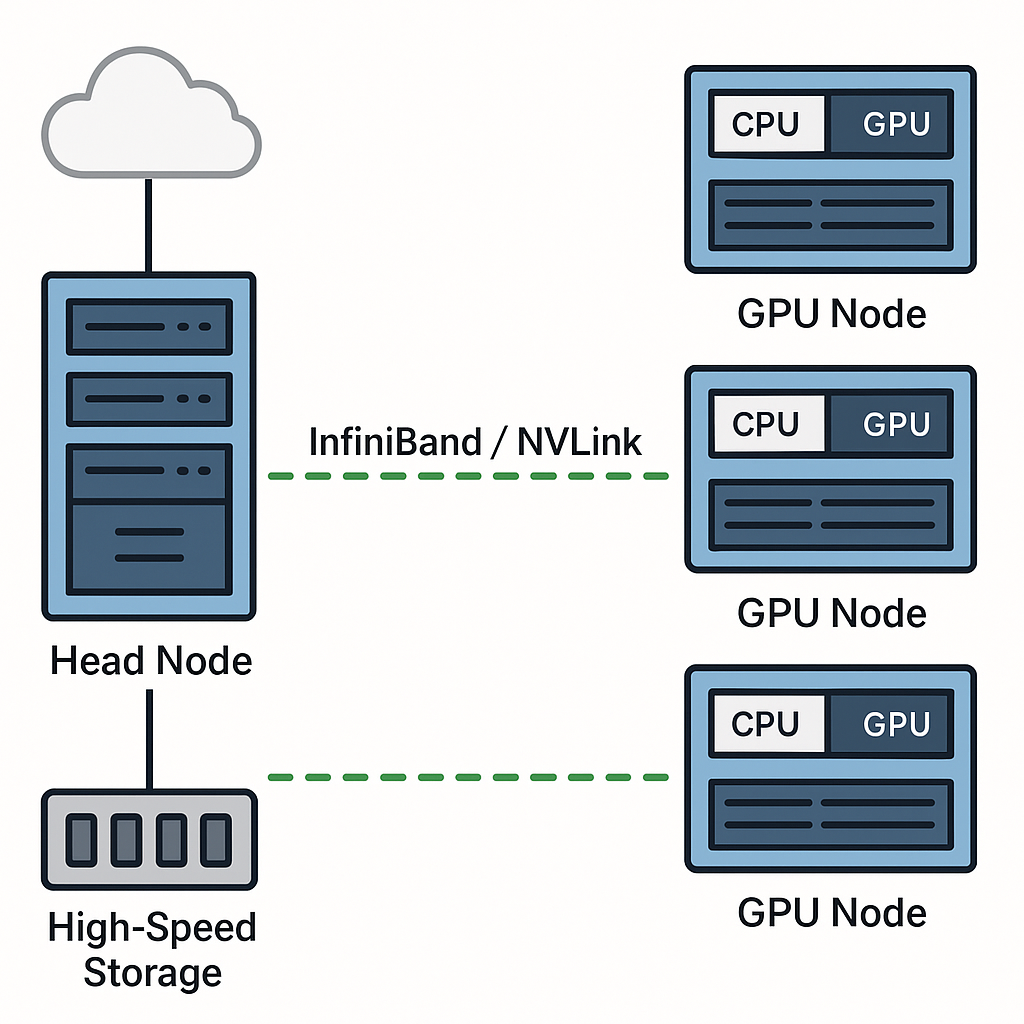
- Two classes of GPU cluster interconnects exist: intra-server/high-bandwidth fabric (NVLink, NVSwitch) and inter-server fabrics (InfiniBand, Ethernet-based RDMA). Each solves different problems: NVLink/NVSwitch optimize GPU-to-GPU bandwidth and low-latency within a server or rack, while InfiniBand (and RDMA over Converged Ethernet variants) connect nodes across racks/data centers with very high throughput and low latency.
- GPUDirect RDMA eliminates host memory copies and CPU involvement for networked GPU data transfer, dramatically lowering latency and CPU overhead—critical for scale-out training and multi-node inference.
- NVSwitch and NVLink enable non-blocking, all-to-all GPU topologies inside servers, delivering aggregate per-GPU bandwidth orders of magnitude higher than PCIe point-to-point. NVSwitch-enabled systems scale large models efficiently.
- For cluster design, the practical tradeoffs are: latency vs reach vs cost vs software stack compatibility. NVLink/NVSwitch are highest bandwidth/lowest latency, but limited to server/rack scope; InfiniBand scales across racks and data centers with HDR/NDR speeds up to 200/400/800 Gbps ports available.
1) Why interconnects matter – practical primer
GPUs are massively parallel compute engines, but many AI/HPC workloads are communication-heavy: gradient synchronizations during training, parameter sharding for large models, embedding/table updates, and distributed inference shards. As you add more GPUs, raw compute scales but communications can quickly become the limiter (Amdahl’s Law in practice). A suboptimal interconnect turns extra GPUs into diminishing returns. Good interconnect design reduces synchronization time, improves utilization, and lowers job run time and cost.
Key metrics to care about:
- Bidirectional bandwidth (GB/s or Tb/s): how much data can flow concurrently.
- Latency (µs–ms): especially for small messages or fine-grained synchronization.
- CPU overhead & zero-copy support: avoids copying through host memory.
- Topology (non-blocking vs partial mesh): affects worst-case contention.
- Reach / scale: in-server vs cross-rack vs cross-data-center.
2) The physical & logical layers – at a glance
Quick glossary
- PCIe (Peripheral Component Interconnect Express): general-purpose device bus used for many GPUs (PCIe form factor). Newer PCIe gens increase lane speed (PCIe 5.0, PCIe 6.0 in roadmap).
- NVLink: NVIDIA’s high-speed point-to-point GPU interconnect for GPU-to-GPU communication within systems, providing far higher effective bandwidth than PCIe for GPU traffic.
- NVSwitch: a switching ASIC that provides non-blocking, all-to-all connectivity to many GPUs inside a server or an NVLink-enabled block (e.g., DGX/HGX). Enables scaling with consistent bandwidth regardless of which GPUs communicate.
- InfiniBand (HDR/EDR/NDR etc.): an HPC fabric for inter-server connectivity with RDMA support; models like HDR (200 Gbps) and NDR (400/800G in roadmap) provide extremely low latency and high throughput.
- GPUDirect RDMA / GPUDirect: NVIDIA technology to allow network adapters to directly read/write GPU memory, bypassing host CPU and host memory copies—critical for efficient multi-node GPU communication.
3) NVLink/NVSwitch vs InfiniBand — head-to-head (summary table)
| Dimension | NVLink / NVSwitch | InfiniBand (HDR, NDR) |
|---|---|---|
| Primary scope | Intra-server, within rack (NVSwitch extends within server clusters) | Inter-server, rack-to-rack, datacenter fabrics |
| Typical bandwidth per GPU (aggregate) | Hundreds of GB/s per GPU via NVLink/NVSwitch (e.g., NVLink4/NVSwitch scales to hundreds of GB/s per GPU). | 100–800 Gbps per NIC port (endpoint). HDR≈200Gb/s, NDR 400/800G emerging. |
| Latency | Extremely low for GPU-to-GPU within NVSwitch fabric | Very low for RDMA (single-digit µs) but typically higher than local NVLink |
| Zero-copy & CPU bypass | Native GPU memory coherency features; very fast L2/L3 cache transfers | Achieved via GPUDirect RDMA and RDMA NICs |
| Topology | Non-blocking all-to-all inside NVSwitch systems | Large distributed clusters, multi-rack training, and situations requiring general-purpose HPC fabric |
| Software stack | CUDA-aware, NCCL (collectives), NVSHMEM, SHARP support in NVSwitch | MPI, RDMA, UCX, OFI, and CUDA-aware MPI; works with NCCL across nodes |
| Best for | Large-model training where GPUs must exchange data quickly inside the server | Large distributed clusters, multi-rack training, and situations requiring a general-purpose HPC fabric |
Takeaway: NVLink/NVSwitch is the fastest for inside-server GPU communication; InfiniBand + GPUDirect RDMA is the practical choice for scaling across servers and racks while preserving high efficiency.
4) Technology deep dives
NVLink & NVSwitch (what they do and why they matter)
- NVLink provides point-to-point high-speed lanes between GPUs; successive NVLink generations increased per-link data rates and link counts per GPU. Combined links give tens to hundreds of GB/s effective per GPU bandwidth.
- NVSwitch is NVLink’s switching fabric: multiple NVLink ports feed into NVSwitch ASICs that create a non-blocking, switch-based interconnect among many GPUs inside a server (e.g., DGX or HGX platforms). This yields consistent, all-to-all bandwidth and makes GPU memory behave more like a larger shared memory pool for collective operations.
Notable fact (load-bearing): NVLink Switch implementations (e.g., GB300 NVL72) can deliver tens of TB/s of aggregate GPU bandwidth and enable very large GPU counts to be treated as coherent clusters for large model training.
NVLink use cases
- Within-node multi-GPU all-reduce and all-gather operations (NCCL benefits).
- Shared GPU L2 caching and SHARP offload in NVSwitch for accelerating reductions (some NVSwitch generations include hardware SHARP support to accelerate collective ops).
GPUDirect RDMA & GPUDirect
GPUDirect RDMA allows NICs to perform direct memory operations to/from GPU memory, avoiding host buffer copies. This reduces latency and CPU cycles and can yield order-of-magnitude improvements for certain patterns.
Key vendor claim: GPUDirect RDMA eliminates intermediate copies and can reduce transfer time significantly; NVIDIA documents show large performance boosts for direct GPU network transfers.
Practical implications:
- Multi-node training frameworks (Horovod, PyTorch DDP with NCCL, MPI) can perform more efficiently when combined with GPUDirect-capable NICs (InfiniBand adapters).
- For maximum benefit, CUDA version compatibility, NIC firmware/drivers, and OS stack need to support kernel bypass and zero-copy paths.
InfiniBand HDR / NDR (Mellanox / NVIDIA Networking)
InfiniBand has been the HPC fabric of choice for years. HDR (200 Gbps) and NDR (400/800 Gbps) are the modern generations designed for extreme throughput and low latency. InfiniBand switches support RDMA, QoS, and advanced offloads.
Example specifications: Mellanox Quantum HDR switches have dozens of HDR 200Gb/s ports providing multi-Tb/s bi-directional throughput and sub-100ns port-to-port latency in some configurations.
Why InfiniBand remains dominant:
- Mature RDMA stack, excellent NICs, switch ecosystems, and tooling (telemetry, UFM).
- Works hand-in-glove with GPUDirect RDMA for high efficiency in multi-node GPU training.
PCIe (the general-purpose bus) and its role
PCIe remains the interface for many GPUs in commodity servers (PCIe cards). Newer generations (PCIe 5.0, PCIe 6.0 and future PCIe 8.0) keep increasing per-lane throughput, but raw PCIe bandwidth remains lower than NVLink aggregate GPU fabrics. PCIe improvements help with host-GPU transfers, NVMe storage, and more, yet they are not a substitute for purpose-built GPU fabrics when one needs very high internal GPU-to-GPU bandwidth.
5) Real-world architectures & patterns
Common deployment patterns
- Single-server NVSwitch cluster (DGX/HGX)
- All GPUs inside a server are interconnected via NVSwitch for maximum GPU-to-GPU bandwidth. Best for small-to-medium clusters where each server is a large GPU brick.
- Rack of HGX/DGX servers connected with InfiniBand
- NVSwitch inside servers + high-speed InfiniBand leaf-spine to stitch servers together. Use GPUDirect RDMA + NCCL for cross-node collectives.
- Cloud GPU clusters (PCIe GPUs, cloud NICs)
- PCIe GPU instances connected via cloud provider fabric (some provide RDMA/elastic fabric adapter features). Cloud is great for elasticity, but on-prem NVSwitch racks can provide better deterministic latency and local bandwidth.
- Hybrid: on-prem accelerator racks + cloud bursting
- Use on-prem for steady heavy workloads and burst to cloud when needed.
Example: DGX H100 / HGX H200 setups
- SGX/HGX servers (SXM NVLink form factor GPUs) are designed to be used with NVSwitch and are common in enterprise AI clusters. Vendor docs show the H100 / H200 family used with NVLink and NVSwitch to achieve consistent intra-node bandwidth.
6) Bottlenecks & failure modes – what kills cluster perf
- Network oversubscription: if the fabric is oversubscribed (e.g., insufficient spine capacity), collective ops stall. Design fat-tree or spine capacity for worst-case collective patterns.
- Small message latency: many gradient updates are small; high-throughput links don’t automatically give low small-message latency—RDMA and NIC offloads matter.
- Host CPU bottlenecks: if GPUDirect isn’t set up or NICs rely on CPU copies, the CPU becomes the limiter.
- Software mismatch: old drivers, incompatible NCCL builds, or misconfigured MPI can wreck performance.
- Thermal / power constraints: high-density GPU racks consume lots of power and heat—data center capabilities must match.
- Mismatch between model parallelism and topology: mapping shards to GPUs, ignoring topology leads to large remote transfers.
7) Optimization checklist (practical)
- Use SMP/NCCL/RCCL with topology awareness so collective ops prefer NVLink local paths.
- Ensure GPUDirect RDMA is enabled end-to-end: NIC drivers, firmware, kernel modules, and CUDA versions must be compatible. Test with microbenchmarks.
- Monitor fabric: latency, packet drops, link flaps (use UFM or vendor telemetry).
- Map workloads to topology: place model shards and data such that heavy all-reduce stays within NVSwitch when possible.
- Avoid oversubscription in spine switches—design the leaf-spine network for worst-case all-to-all traffic.
- Use persistent RDMA threads or dedicated NIC cores for extremely low latency.
- Keep firmware updated but validated; NIC/switch firmware changes can affect RDMA/GPUDirect behavior.
8) Cost & procurement considerations (2025 lens)
- NVSwitch/NVLink systems are premium (DGX/HGX systems cost significantly more per rack due to specialized hardware and power). But they deliver top efficiency for large model training.
- InfiniBand fabrics require adding expensive switches and HDR/NDR NICs, but they are essential to scale across many servers. Factor in switch port count, cabling (OSFP/QSFP transceivers), and management software.
- Cloud: for experiments, cloud GPU instances provide flexibility. For steady heavy training, on-prem with NVSwitch + InfiniBand may yield better throughput per dollar.
- TCO factors**: power (PUE), cooling, space (rackU), utilization (scheduling efficiency), and software engineering time to optimize multi-node training.
9) Future roadmap – what to watch (next 2–5 years)
- NVLink evolutions and broader coherence models: deeper NVSwitch features (SHARP offload, enhanced collective acceleration) are appearing in newer NVSwitch generations.
- PCIe 6.0 / 8.0 and advanced chiplet packaging: will push host-device bandwidth, but optical interconnects and specialized fabrics may still be necessary for GPU all-to-all needs.
- Faster InfiniBand (800G gradients) and optical fabrics: NDR and beyond will continue to increase per-port capacity and reduce bottlenecks.
- Disaggregated memory & coherent fabrics: projects aiming to make GPU memory more accessible across nodes (research & vendor roadmaps). Watch for coherent memory announcements from vendors.
10) Practical recommendations – choose based on workload
If you run single-node large-model training (a few racks)
- Invest in NVLink/NVSwitch HGX/DGX servers so that most heavy communication stays local. Use SXM form factor GPUs.
If you need to scale across many racks
- Use NVSwitch inside servers + InfiniBand HDR/NDR fabric across racks with GPUDirect RDMA and UCX/NCCL tuned for cross-node collectives.
If budget-constrained or cloud-native
- Start on PCIe GPU instances in the cloud, pick cloud providers that support RDMA/Elastic Fabric Adapter features; for on-prem, consider hybrid solutions and incremental upgrades (start with high-density PCIe servers and add faster NICs/switches).
Appendix A — Quick reference tables & facts
A.1 NVLink / NVSwitch snapshot (vendor highlights)
- NVLink + NVSwitch provide hundreds of GB/s per GPU in modern Hopper/Grace systems and can stitch many GPUs into a coherent fabric. Examples: NVL72/GB300 NVSwitch implementations advertise extremely high aggregate bandwidth for large model parallelism.
A.2 InfiniBand snapshot
- HDR: ~200 Gbps per port (QSFP56/HDR) — mature.
- NDR: 400 Gbps and higher ports (OSFP224/800G in development) — next gen. Mellanox / NVIDIA Quantum switches provide multi-Tb/s aggregate throughput in compact switch fabrics.
A.3 PCIe snapshot
- PCIe 4.0: x16 ≈ 64 GB/s raw (bidirectional, per direction specifics vary).
- PCIe 5.0: doubles Gen4 speed (theor. x16 ~128 GB/s), enabling faster host-device transfers but still usually less effective for multi-GPU all-to-all than NVLink fabrics.
Appendix B — Sample microbenchmarks & how to validate
When validating a GPU cluster fabric:
- Run NCCL tests (all-reduce / all-gather latency and bandwidth across different GPU pairs).
- IB-perf / RDMA-bench for NIC/switch baseline.
- GPUDirect microbench: measure host-bypassed transfers vs host-copy path.
- Synthetic model training: run a small distributed training job with representative batch sizes and measure throughput and scaling efficiency.
Vendor docs and NVIDIA developer guides include sample commands and recommended test suites.
Closing: short checklist before you buy/build
- Define your primary workload (single-node max performance vs multi-node scale).
- Decide GPU form factor (SXM for NVLink/NVSwitch vs PCIe for cost/mix).
- Plan for network fabric (InfiniBand HDR/NDR for multi-rack; 100/200/400G Ethernet RDMA for some cloud use cases).
- Ensure GPUDirect RDMA support across OS, NIC, drivers, and CUDA.
- Budget for power/cooling, switch ports, transceivers, and cabling.
- Design topology with oversubscription and worst-case collective traffic in mind.
- Test early with microbenchmarks and scale tests.
Sources & further reading (key references used)
- NVIDIA: NVLink & NVSwitch documentation and GB300 NVL72 details. (NVIDIA)
- NVIDIA: H100 GPU product page (Hopper architecture). (NVIDIA)
- NVIDIA: GH200 / Grace Hopper Superchip page. (NVIDIA)
- NVIDIA Developer Docs: GPUDirect RDMA. (NVIDIA Docs)
- Mellanox / NVIDIA Networking: HDR InfiniBand switch whitepaper and Quantum series. (NVIDIA)
- NVSwitch technical blog & NVSwitch acceleration features. (NVIDIA Developer)
- PCIe 5.0 / PCIe 8.0 articles and industry updates. (logic-fruit.com)
Comments