
If you’re managing multiple applications or building an identity and access management (IAM) strategy in 2025, you’ve probably encountered two terms that seem to overlap: SAML and SSO. Are they the same thing? Can you have one without the other? And more importantly, which one does your organization actually need?
The confusion is understandable. These technologies often work hand-in-hand, but they serve fundamentally different purposes in the authentication ecosystem. While SSO creates a seamless login experience for users, SAML is one of the protocols that makes it possible. Understanding this distinction isn’t just technical nitpicking—it’s essential for building secure, scalable, and user-friendly authentication systems.
In this comprehensive guide, we’ll break down what SAML and SSO actually are, how they differ, when to use each, and what the future holds for identity management as we navigate 2025’s evolving cybersecurity landscape.
Quick Takeaways (TL;DR)
Before we dive deep, here are the essential points you need to know:
| Key Point | Details |
|---|---|
| SSO is a method, SAML is a protocol | SSO describes what users experience (one login, multiple apps). SAML is one way to technically implement SSO. |
| You can have SSO without SAML | SSO can be implemented using OAuth 2.0, OpenID Connect, Kerberos, or SAML |
| SAML is ideal for enterprises | Best for B2B apps, internal tools, and complex attribute requirements |
| Modern alternatives exist | OpenID Connect is better for mobile apps and consumer-facing applications |
| Security vs. Simplicity tradeoff | SAML offers robust security but requires more complex implementation |
| Market is massive and growing | IAM market: $22.99B in 2025, projected to reach $65.70B by 2034 |
| Passwordless is the future | 70% of organizations planning passwordless authentication by 2025 |
| Consider your use case | Choose based on your specific needs: enterprise vs. consumer, web vs. mobile, B2B vs. B2C |
What is SSO (Single Sign-On)?
Single Sign-On (SSO) is an authentication method that allows users to access multiple applications and services using just one set of login credentials. Think of it as a master key that unlocks multiple doors—you authenticate once, and you’re granted access to everything you need without repeatedly entering passwords.
The beauty of SSO lies in its simplicity. Instead of juggling dozens of usernames and passwords for different tools, employees log in once through a central authentication service and gain seamless access to all their work applications—whether that’s Slack, Salesforce, Google Workspace, or your internal company portal.
How SSO Actually Works
SSO operates on a trust relationship between two key players:
- Identity Provider (IdP): The central authentication service that verifies user credentials
- Service Provider (SP): The applications and services users want to access
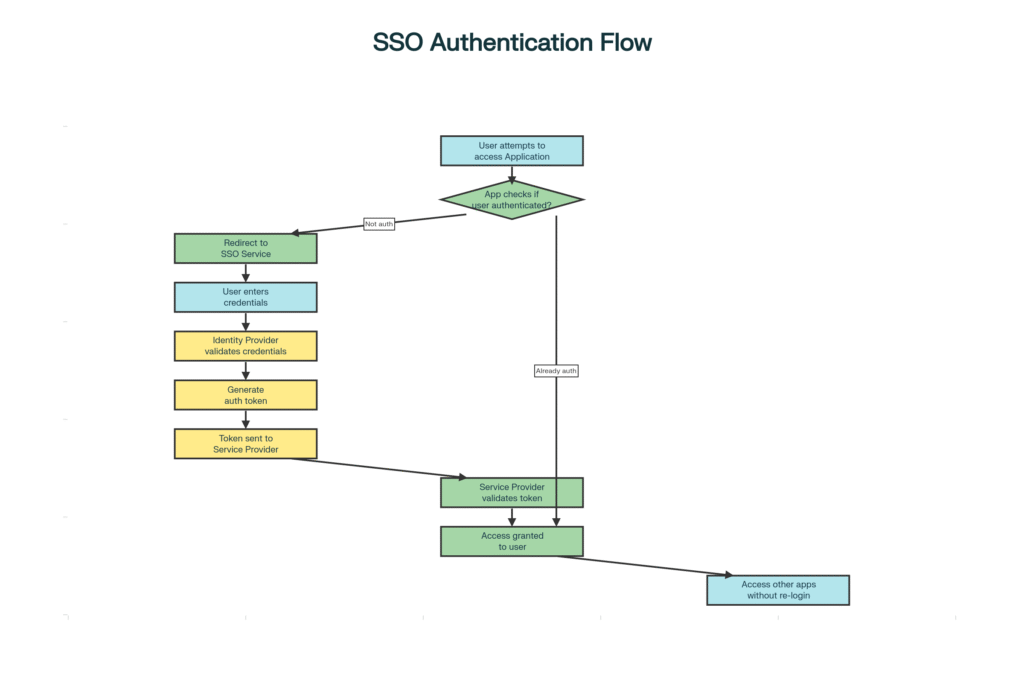
Here’s the step-by-step flow:
- You try to access an application (like Salesforce)
- App checks your authentication status – Are you already logged in?
- Redirects to Identity Provider if you’re not authenticated
- You enter credentials once at the IdP
- IdP validates and creates a token – A secure authentication token with your identity
- Token sent to application – The app validates this token
- Access granted – You’re now logged in
- Seamless access to other apps – No re-login needed for connected services
The critical part? That token stays active in your browser session. So when you navigate to another application that uses the same SSO system, the process is instantaneous—no login required.
Real-World SSO Benefits: The Numbers Don’t Lie
The business case for SSO is compelling, backed by concrete data:
Cost Savings:
- Password resets cost $70 per ticket on average
- They account for 30-50% of IT helpdesk tickets
- For 1,000 employees: SSO can save $140,000 annually
Time Savings:
- Employees save 11 hours per year on password management
- Each login is 5-15 seconds faster than traditional authentication
- Reduced friction = higher productivity
Security Improvements:
- 81% of security incidents involve breached credentials
- 68% of data breaches involve human error
- SSO reduces password reuse and weak password creation
User Experience:
- Average person manages 70-80 passwords
- 31% lose patience during password resets
- 19% abandon brands after forgetting passwords
What is SAML (Security Assertion Markup Language)?
While SSO describes the what (one login for everything), SAML describes the how—it’s the technical language that makes SSO possible across different domains and organizations.
SAML stands for Security Assertion Markup Language, an open standard protocol that uses XML (Extensible Markup Language) to exchange authentication and authorization data between an Identity Provider and a Service Provider. Released over 20 years ago, SAML 2.0 remains the enterprise standard for federated identity management.
The Anatomy of SAML: Three Core Components
1. Assertions
Digitally signed XML messages that prove a user’s identity. Think of them as digital passports containing your identity information, validity period, and cryptographic signature.
2. Protocols
Define how SAML requests and responses are formatted and transmitted between systems.
3. Bindings
Specify how SAML messages are carried over standard protocols like HTTP.
How SAML Authentication Works
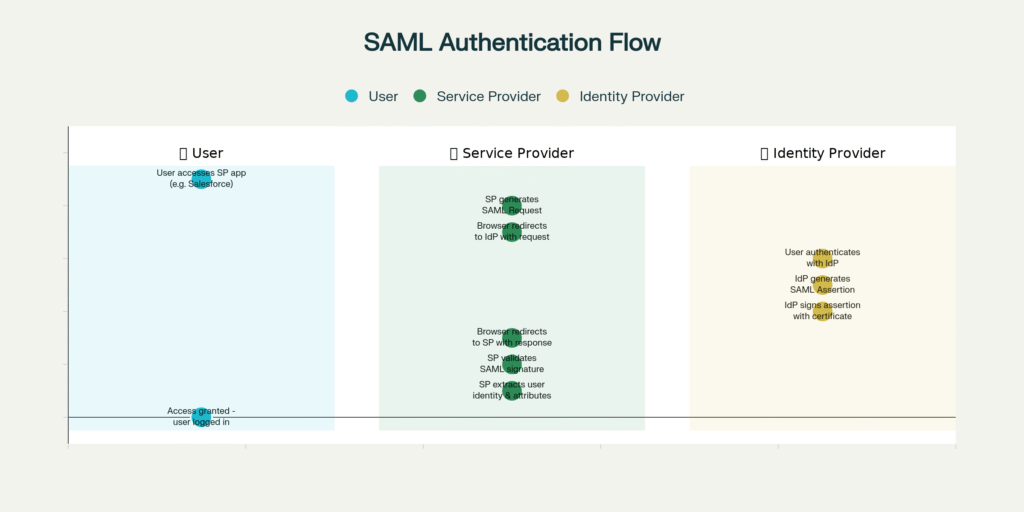
The SAML flow in action:
- Employee tries to access Salesforce (Service Provider)
- Salesforce generates SAML Request – “Who is this user?”
- Browser redirects to the company IdP (like Okta) with a request
- IdP authenticates user – Login screen appears if not already logged in
- IdP creates SAML Assertion – XML token with user identity, roles, permissions
- Assertion is digitally signed – Using IdP’s certificate to prevent tampering
- Browser redirects back to Salesforce with signed SAML Response
- Salesforce validates the signature – Confirms it’s legitimate
- User identity and attributes extracted – Salesforce knows who you are and what you can do
- Access granted – You’re logged into the application
Why Enterprises Love SAML
- Federated Identity Management – Users authenticate once and access resources across completely different organizational domains
- Credentials Never Shared – Service providers never see or store passwords; only the IdP handles them
- Rich Attribute Exchange – Pass detailed user metadata (department, roles, permissions) to applications
- Cryptographically Secure – Digital signatures ensure tampering is immediately detected
- Open Standard – Vendor-neutral, freely implementable, widely supported for 20+ years
SAML vs SSO: Side-by-Side Comparison
The most important thing to understand is this: SAML and SSO are not alternatives to each other. SSO is the user experience and authentication strategy; SAML is one of several protocols that can implement SSO.
The Core Differences Explained
| Aspect | SAML (Security Assertion Markup Language) | SSO (Single Sign-On) |
|---|---|---|
| What It Is | Protocol/Standard | Authentication Method/Process |
| Primary Function | Any scenario requiring a single login for multiple apps | Provides seamless user experience across multiple applications |
| Technology Type | XML-based messaging protocol | Protocol-agnostic authentication framework |
| Data Format | XML (Extensible Markup Language) | Varies by protocol (XML, JSON, binary) |
| Implementation Options | Single protocol with defined specifications | Can use SAML, OAuth, OpenID Connect, or Kerberos |
| Best Use Cases | Enterprise SSO, B2B applications, complex identity federation | Depends on the implementation protocol |
| Mobile Support | ❌ Limited – not ideal for mobile/hybrid apps | ✅ Yes – depends on protocol choice |
| Setup Complexity | High – XML parsing, certificate management, metadata exchange | Moderate – varies by chosen protocol |
| Security Features | Managed by the SSO service | Digital signatures, encryption, and token-based authentication |
| Industry Adoption | Enterprise and government sectors (very high) | Universal across all sectors |
| What It Transmits | User attributes, roles, permissions, identity assertions | Authentication tokens and session data |
| Session Management | Managed by Identity Provider | Managed by SSO service |
| Maintenance Needs | Regular certificate updates, configuration management | Varies by implementation |
| Developer Experience | Complex – requires XML expertise | Varies – OIDC is easier than SAML |
Authentication Protocol Comparison: When to Use What
Not all SSO implementations are created equal. Here’s how SAML stacks up against alternative protocols:
| Protocol | Primary Use | Data Format | Best For | Mobile Friendly | Enterprise Adoption |
|---|---|---|---|---|---|
| SAML 2.0 | Authentication & Authorization | XML | Enterprise SSO, Internal tools, Legacy systems | ❌ No | ⭐⭐⭐⭐⭐ Very High |
| OAuth 2.0 | Authorization (API access) | JSON | Third-party API access, Delegated permissions | ✅ Yes | ⭐⭐⭐⭐ High |
| OpenID Connect | Authentication (User Identity) | JSON (JWT) | Modern web apps, Mobile apps, B2C login | ✅ Yes | ⭐⭐⭐ Growing |
| Kerberos | Network Authentication | Binary | On-premises Windows environments | ❌ No | ⭐⭐ Medium |
2025 IAM Market Trends & Statistics
Understanding the current landscape helps contextualize where SAML and SSO fit in modern identity strategies:
Market Growth
- 2024 IAM Market: $20.41 billion
- 2025 IAM Market: $22.99 billion
- 2034 Projection: $65.70 billion
- Annual Growth Rate: 12.40% CAGR
Security Challenges Driving Adoption
- 81% of security incidents involve breached credentials
- 68% of data breaches involve human error
- 87% of firms experienced identity-related security breaches
- 40% of organizations experienced GenAI security incidents
Password Management Crisis
- Average person manages 70-80 passwords
- 30-50% of IT support tickets are password resets
- Each password reset costs approximately $70
- 31% of consumers lose patience during password resets
- 19% abandon brands after forgetting passwords
Passwordless Authentication Surge
- 70% of organizations planning passwordless authentication by 2025
- 87% of businesses are deploying or planning to deploy passkeys
- Passwordless market: $22B in 2025 → approaching $90B by 2034
When to Use SAML vs Other SSO Methods
Choosing the right authentication protocol can make or break your implementation. Here’s your practical decision guide:
Choose SAML When You Need:
Enterprise Workforce Authentication
- Internal employee access to SaaS applications
- Complex attribute requirements (roles, departments, permissions)
- Integration with Active Directory or LDAP directories
- Strong security with audit trail requirements
B2B Identity Federation
- Cross-organizational access for partners and contractors
- Customer SSO requirements (enterprise SaaS must-have)
- Multi-tenant applications serving enterprise clients
- Federated identity across domain boundaries
Regulated Industries & Government
- Healthcare (HIPAA compliance requirements)
- Financial services (regulatory compliance)
- Government agencies with strict security mandates
- Industries requiring detailed audit logs
Legacy Enterprise Systems
- On-premises applications with established SAML support
- Enterprise software without modern protocol support
- Active Directory Federation Services (ADFS) environments
- Systems purchased years ago with limited update capabilities
Choose OpenID Connect When You Need:
Modern Application Development
- Customer-facing mobile applications (iOS, Android)
- Single-page applications (SPAs) and Progressive Web Apps
- Modern web apps with JSON-based APIs
- Rapid development with developer-friendly implementation
Consumer Authentication
- B2C applications and consumer-facing services
- “Social login” options (Sign in with Google, GitHub, etc.)
- Multi-tenant SaaS platforms for small businesses
- Startup products requiring a fast time-to-market
Developer Experience Priority
- Teams without XML expertise
- Projects requiring extensive documentation and libraries
- Cloud-native applications built on modern frameworks
- Situations where implementation speed matters
Choose OAuth 2.0 When You Need:
API Authorization
- Third-party apps accessing user data via APIs
- Delegated access permissions (“Allow app X to read your Google Calendar”)
- Machine-to-machine communication
- Service accounts and automated processes
Important Note: OAuth 2.0 alone doesn’t provide user authentication—it’s purely for authorization. Pair it with OpenID Connect for full authentication capabilities.
Quick Decision Guide
| Your Scenario | Recommended Solution | Why This Choice |
|---|---|---|
| Enterprise employee access to SaaS apps | SAML SSO | Strong security, rich attributes, broad enterprise support |
| Customer-facing mobile app authentication | OpenID Connect (OIDC) | Mobile-friendly, modern, easy to implement |
| Third-party apps accessing user data/APIs | OAuth 2.0 | Designed for delegated authorization |
| Small business with <50 employees | Google Workspace or Microsoft 365 SSO | Built-in, cost-effective, minimal setup |
| Multi-tenant B2B SaaS requiring customer SSO | SAML (must support) + OIDC (flexibility) | Enterprise customers expect SAML |
| On-premises Windows environment | Kerberos or SAML with ADFS | Native Active Directory integration |
| Hybrid cloud and on-prem applications | SAML with modern IdP | Works across both environments |
| Startup with modern web apps only | OpenID Connect | Faster implementation, developer-friendly |
Pros and Cons: SSO and SAML
Every authentication approach involves tradeoffs. Here’s what you need to know:
SSO Benefits and Challenges
The Advantages:
Enhanced User Experience
- Single login eliminates password fatigue
- Frictionless access to all applications
- Higher user satisfaction and adoption rates
Increased Productivity
- Saves 11 hours per employee annually
- 5-15 seconds faster per login
- Reduced interruption to workflow
Reduced IT Costs
- Eliminates 30-50% of helpdesk tickets
- Saves ~$140,000 annually for 1,000 employees
- Less time spent on password management
Improved Security
- Fewer credentials mean fewer vulnerabilities
- Centralized policy enforcement
- Easier to implement MFA across all apps
Better Compliance
The Challenges:
Single Point of Failure
- SSO compromise = all apps at risk
- Downtime affects the entire organization
- Requires exceptional reliability measures
Vendor Dependency
- Reliance on the SSO provider’s uptime
- Security depends on vendor practices
- Business continuity risks
Implementation Complexity
- Integration with each application required
- Configuration of trust relationships
- Ongoing maintenance demands
SAML Benefits and Challenges
The Advantages:
Strong Security
- XML digital signatures prevent tampering
- Encryption protects sensitive data
- Credentials stay with the IdP only
Cross-Domain Federation
- Authentication across organizational boundaries
- Enables partner/contractor access
- No local accounts needed
Rich Attribute Support
- Pass detailed user metadata
- Department, roles, and permissions included
- Fine-grained authorization possible
Open Standard
The Challenges:
XML Complexity
Limited Mobile Support
XML Security Vulnerabilities
- Susceptible to signature wrapping attacks
- Requires careful implementation
- Parser flaws can be exploited
Configuration Overhead
- Manual metadata exchange required
- Each IdP-SP connection needs to be set up
- Doesn’t scale well for multi-IdP scenarios
Maintenance Burden
Real-World Use Cases: Where SAML and SSO Shine
Understanding actual deployment scenarios provides practical guidance:
Enterprise Workforce Authentication
The Challenge: A Fortune 500 company with 50,000 employees accessing 200+ applications daily.
The Solution: SAML-based SSO through a central IdP (Okta or Microsoft Entra ID).
The Benefits:
- Single login in the morning grants access to everything
- IT manages all permissions from one central location
- Role changes update across all systems instantly
- Employee departures = one-click access removal
Education Sector Federation
The Challenge: Universities with tens of thousands of students/faculty needing access to learning management systems, library databases, research tools, and third-party services.
The Solution: SAML federation enabling cross-organizational access.
The Benefits:
- Students authenticate once through the university portal
- Access course materials, library resources, and email seamlessly
- External publishers accept SAML authentication
- No separate accounts needed for each resource
Healthcare Compliance
The Challenge: Doctors and nurses accessing dozens of systems per shift—EHR, labs, imaging, scheduling, and billing.
The Solution: SAML SSO with HIPAA-compliant security features.
The Benefits:
- Authenticate once at shift start
- Move seamlessly between patient care systems
- Reduced authentication friction improves patient care
- Detailed audit trails for compliance
B2B SaaS Enterprise Sales
The Challenge: SaaS vendors trying to sell to enterprise customers who demand SSO.
The Solution: SAML implementation to meet enterprise requirements.
The Reality:
- SAML support is non-negotiable for enterprise deals
- Can make or break six-figure contracts
- Enterprises expect it as a standard feature
- Implementation complexity = a barrier for startups
The Future of Authentication: 2025 and Beyond
The identity landscape is evolving rapidly. Here’s what’s shaping the future:
Passwordless Authentication Revolution
The Shift Happening Now:
- 70% of organizations plan to be passwordless by 2025
- 87% deploying or planning passkeys
- Market growing from $22B to nearly $90B by 2034
What This Means:
- Biometric authentication (fingerprint, facial recognition)
- Hardware security keys (YubiKey, etc.)
- Passkeys replacing passwords entirely
- SSO evolving to integrate passwordless methods
AI and Machine Learning Integration
Current Developments:
- Behavioral biometrics analyzes user patterns
- Risk-based authentication adjusts security dynamically
- AI-powered threat detection and response
- Automated identity verification
Decentralized Identity
Emerging Trends:
- Blockchain-based identity verification
- Self-sovereign identity models
- User-controlled credentials
- Privacy-preserving authentication
Zero Trust Architecture
The New Security Paradigm:
- “Never trust, always verify” approach
- Continuous authentication and authorization
- Micro-segmentation of access
- Context-aware access decisions
Final Recommendations: Making Your Choice
As you build your IAM strategy for 2025 and beyond, consider these key factors:
For Enterprises and B2B SaaS Companies:
- Implement SAML for workforce authentication and enterprise customer requirements. It’s not optional—it’s expected.
- Add OpenID Connect for mobile apps and modern web applications where user experience matters.
- Plan for passwordless integration to future-proof your authentication strategy.
For Startups and Consumer Applications:
- Start with OpenID Connect for faster implementation and better developer experience.
- Add SAML later when you start selling to enterprise customers (and they’ll definitely ask for it).
- Leverage identity providers like Auth0, Okta, or AWS Cognito that support multiple protocols.
For Small to Medium Businesses:
- Use built-in SSO from Google Workspace or Microsoft 365 for cost-effective implementation.
- Evaluate complexity vs. benefits before implementing SAML.
- Consider managed services to reduce operational burden.
The Bottom Line
SAML and SSO aren’t competitors—they’re partners. SSO provides the user experience your employees and customers demand, while SAML offers one robust way to implement it securely, especially in enterprise environments.
The “best” choice depends entirely on your specific context:
- Your users (employees vs. customers)
- Your applications (web vs. mobile, modern vs. legacy)
- Your security requirements (compliance, federation needs)
- Your resources (development time, expertise, budget)
The future of authentication is clear: passwordless, seamless, and secure. Whether you choose SAML, OpenID Connect, or a hybrid approach, the goal remains the same: to protect your users while making their lives easier.
Ready to Explore IAM Solutions?
Looking for the right identity and access management tools to implement SSO for your organization? Discover leading platforms, compare features, and find the perfect solution for your security needs. Explore IAM Tools and SSO Platforms
Browse comprehensive listings of identity providers, authentication solutions, and enterprise-grade security platforms—all in one place.
Have questions about implementing SAML or SSO? The identity management landscape continues evolving, and staying informed is crucial for making the right decisions for your organization’s security posture.
Comments